Module 02: Core Agent Building Blocks
An agent is not a monolith — it’s a loop with state, tools, and memory.
This module provides a deep dive into the technical architecture of agentic systems. It breaks down the canonical agent loop into five distinct steps—observe, think, decide, act, and update state—explaining what happens at each stage and why it matters for debugging. The module covers tool calling mechanics with the three-part structure (function, schema, wrapper), explores three memory architectures (short-term, long-term, and episodic) with their implementation patterns, and clarifies the critical distinction between observations and actions. By the end, you’ll build a production-ready single-loop agent with proper state management, error handling, and execution tracking.
Agent Loop, Tool Calling, Agent Memory, Short-term Memory, Long-term Memory, Episodic Memory, Observations vs Actions, State Management, LangChain, Production Agents, Error Handling, Termination Conditions
What You’ll Learn
Module 1 showed you what makes something an agent. Module 2 shows you how to build one.
This module focuses on implementation. You’ll work through the technical mechanics that make agents function—the execution loop, tool interfaces, memory systems, and state management. These aren’t abstract concepts; they’re the components you’ll debug when things break in production.
The Agent Loop
The agent loop gets broken down into its five core steps: observe, think, decide, act, and update state. You’ll see how each step works and why they matter. Understanding this loop pattern means you can work with any agent framework, not just the one we’re using here—the mechanics transfer.
Tool Calling Mechanics
Tool calling explains how agents interact with external systems—APIs, databases, calculators. You’ll learn the three-part structure (function, schema, wrapper) that makes tools reliable. Tool design determines whether your agent can actually accomplish tasks or just talks about them. Get this wrong and nothing else matters.
Memory Architecture
Memory architecture covers the three types agents use: short-term for conversations, long-term for persistence, and episodic for learning from past interactions. You’ll understand when to use each. Memory separates demos from real systems—conversation without memory frustrates users.
Observations vs Actions
The observations-versus-actions section clarifies a distinction that seems obvious until you’re debugging. Did the agent fail because it didn’t observe correctly, or because it took the wrong action? This distinction helps you debug systematically rather than guessing where problems occur.
Module Structure
- Time: 4-5 hours with exercises
- Prerequisites: Module 1 complete, basic understanding of LangChain
The module splits roughly into:
- 35% Agent loop mechanics
- 25% Tool calling patterns
- 25% Memory architectures
- 15% Building it yourself
The Exercise
This module features one comprehensive exercise that builds a complete tool-using agent:
- Step 1: Setup and Dependencies (15 min). Configure LangChain and set up the development environment.
- Step 2: Define Custom Tools (45 min). Create database query, calculator, and weather tools with proper schemas and error handling.
- Step 3: Build the Agent (60 min). Implement the agent loop with tool selection, execution, and state management.
- Step 4: Test the Agent (30 min). Verify tool calling, memory persistence, and error handling.
- Extension Challenges (45 min). Add observation debugging, hybrid memory, and cost tracking.
By the end, you should be able to build an agent that handles real tasks, not just toy examples. The exercise is representative of actual production work—querying systems, processing responses, maintaining context across interactions.
Why This Actually Matters
Every component in this module maps directly to production debugging scenarios.
The agent loop determines your system’s reliability. When an agent gets stuck, you need to know which step failed—was it observation gathering, LLM reasoning, action selection, or state update? Without understanding the loop, you’re debugging blind.
Tool design is where most agent failures originate. Ambiguous descriptions lead to wrong tool selection. Missing error handling causes crashes. Poor validation allows invalid inputs. The three-part structure (function, schema, wrapper) prevents these issues.
Memory architecture affects both user experience and costs. No memory frustrates users who have to repeat context. Too much memory explodes your token costs. The right memory strategy balances continuity with efficiency.
Observation-action clarity cuts debugging time by 50% or more. When you can immediately identify “the observation was incomplete” versus “the action was wrong,” you fix problems faster.
Introduction: Deconstructing the Agent
In Module 1, you learned what makes a system agentic. Now we’ll explore how agents actually work under the hood.
Every agent, regardless of complexity, is built on the same fundamental loop:

This module breaks down each component in detail, giving you the knowledge to build robust, debuggable agent systems.
Key insight: Production agents are not magic — they’re engineered loops with well-defined state transitions.
The diagram shows the complete cycle:
- Observe (gathering input and current state)
- Think (LLM reasoning about what to do)
- Decide (choosing which action to take)
- Act (executing tools or operations)
- Update State (storing results in memory)
- then either repeating or terminating.
This six-step pattern (five actions plus the termination check) appears in every agent system. Simple chatbots implement it minimally. Complex multi-agent systems run multiple instances of it. The sophistication varies, but the structure stays constant.
Why understanding this loop matters: Most agent frameworks abstract this away. When you call agent.run() in LangChain or set up a workflow in LangGraph, this loop is executing behind the scenes. When something breaks—the agent gets stuck, picks the wrong tool, or forgets context—you need to know which step failed.
Did it fail at Observe because it didn’t have the right context? At Think because the prompt was unclear? At Decide because tool descriptions were ambiguous? At Act because the tool crashed? At Update State because memory overflowed? Without understanding the loop, you’re debugging blind.
The shift from Module 1: Previously, you saw agents from the outside—their capabilities, when to use them, common failure modes. Now you’re seeing the internal mechanism. You’ll learn what actually happens in each step, how data flows between them, and where production systems typically break.
The engineering challenge: Each step requires careful implementation. Observe needs context window management or you’ll exceed token limits. Think needs clear prompts or the LLM won’t reason effectively. Decide needs well-designed tool schemas or selection fails. Act needs error handling because external systems are unreliable. Update State needs memory strategies or context gets lost.
The termination check is equally critical. Without proper conditions, the loop runs forever. With too-aggressive conditions, it stops prematurely. You need multiple termination criteria: task completion (success), max iterations (safety), cost limits (budget), timeout (performance), and loop detection (stuck states).
What this means for you: You can’t just chain LLM calls together and hope for agency. Each step needs intentional design. The loop needs structure or it becomes incoherent. State needs management or it grows unbounded. Tools need validation or they fail unpredictably.
By the end of this module, you’ll recognize this loop in any agent system—even when frameworks hide it. You’ll see where different implementations make tradeoffs, where they add complexity, and where they cut corners. More importantly, you’ll know how to build it yourself when existing frameworks don’t fit your needs. The loop is conceptually simple. Making it reliable in production is the hard part. That’s what we’re covering here.
Agent Loop Anatomy
The Canonical Agent Loop
Let’s examine the agent loop in precise detail:
def agent_loop(task: str, max_iterations: int = 10) -> str:
    """
    The canonical agent execution loop.

    This is the foundation of every agent system.
    """
    # Initialize state
    state = {
        "task": task,
        "conversation_history": [],
        "iteration": 0,
        "completed": False
    }

    while not state["completed"] and state["iteration"] < max_iterations:
        # STEP 1: OBSERVE
        # Gather current context: task, history, available tools, memory
        observation = observe(state)

        # STEP 2: THINK
        # LLM reasons about what to do next
        reasoning = llm_think(observation)

        # STEP 3: DECIDE
        # Choose an action based on reasoning
        action = decide_action(reasoning)

        # STEP 4: ACT
        # Execute the chosen action (could be tool call or final answer)
        result = execute_action(action)

        # STEP 5: UPDATE STATE
        # Store the outcome and update memory
        state = update_state(state, action, result)

        # TERMINATION CHECK
        if is_task_complete(state):
            state["completed"] = True

        state["iteration"] += 1

    return extract_final_answer(state)
This code represents the pattern every agent system implements, whether explicitly or implicitly. The structure is deceptively simple—a while loop with five function calls—but each step requires careful implementation to work reliably.
The state dictionary is the agent’s working memory. It tracks the original task, everything that’s happened so far, which iteration we’re on, and whether we’re done. This state persists across loop iterations, accumulating context as the agent progresses.
The while condition has two parts: not state["completed"] checks if the agent finished its task, while state["iteration"] < max_iterations is a safety valve. Without the second condition, a logic error or unclear task could make the agent loop forever. Always include a maximum iteration limit in production systems.
The five steps each serve distinct purposes, and their order matters. You can’t decide what to do before observing the situation. You can’t act before deciding. You can’t update state before seeing the action’s result. The sequence is deliberate.
The termination check happens after state updates because the update might set completed = True. If the last action was generating a final answer, the state update marks the task complete, and the next iteration check breaks the loop.
Notice what’s not in this code: no direct user interaction handling, no complex branching logic, no error recovery. Those belong in the individual step functions. The loop itself stays clean and focused on orchestration.
Step-by-Step Breakdown
Step 1: Observe
Purpose: Gather all relevant information for decision-making
Components:
def observe(state: dict) -> dict:
    """
    Observation includes:

    - Original task/goal
    - Conversation history (what's happened so far)
    - Available tools (what actions are possible)
    - Current memory/context
    - Previous action outcomes
    """
    return {
        "task": state["task"],
        "history": state["conversation_history"][-5:],  # Last 5 turns
        "available_tools": get_available_tools(),
        "iteration": state["iteration"],
        "previous_result": state.get("last_result")
    }
Observation is information gathering. The LLM needs context to make good decisions, but it can’t see your entire system state—you have to explicitly package what matters into the observation.
The task reminds the agent what it’s trying to accomplish. This matters more than you’d think. After several iterations of tool calls and intermediate results, the LLM can lose sight of the original goal. Including the task in every observation keeps it grounded.
Conversation history is limited to the last 5 turns in this example. Why truncate? Context windows have limits. If you’ve run 50 iterations with verbose tool outputs, including everything would exceed the LLM’s maximum tokens. The tradeoff: recent context versus comprehensive history. Most agents need recent context more urgently than ancient history.
Available tools tells the LLM what actions it can take. Without this list, the LLM might hallucinate tool names or try to call functions that don’t exist. Explicit tool enumeration prevents most hallucination issues.
The iteration count helps the LLM understand where it is in the process. On iteration 1, it might approach the task ambitiously. On iteration 8 of 10, it might realize it needs to wrap up or simplify its approach.
Previous result provides feedback from the last action. If a tool call failed, the LLM sees the error and can adapt. If it succeeded, the LLM sees the output and can decide what to do next.
Key considerations:
- What context is needed for the LLM to decide effectively?
- How much history to include? (context window management)
- What metadata helps the agent understand its position in the task?
Step 2: Think
Purpose: LLM reasons about the current situation and plans next action
Implementation:
def llm_think(observation: dict) -> dict:
    """
    The LLM receives observation and produces reasoning.

    This is where the "intelligence" happens.
    """
    prompt = f"""
    Task: {observation['task']}

    Progress so far:
    {format_history(observation['history'])}

    Available tools:
    {format_tools(observation['available_tools'])}

    What should you do next? Explain your reasoning.
    """

    response = llm.complete(prompt)

    return {
        "reasoning": response.text,
        "tool_calls": response.tool_calls if response.tool_calls else None
    }
This is where the LLM does its actual work. You’re asking it to reason about the situation and decide what to do next.
The prompt structure matters significantly. You’re providing the task (what to accomplish), progress so far (what’s already happened), and available tools (what actions are possible). This gives the LLM everything it needs to make an informed decision.
“Explain your reasoning” is deliberate. You want the LLM to think through its approach, not just jump to an action. This chain-of-thought prompting improves decision quality and makes debugging easier—you can see why the agent chose a particular action.
The response contains two things: the reasoning text (the LLM’s thought process) and potentially tool_calls (if it decided to use a tool). Modern LLMs with function calling can return structured tool invocations alongside their reasoning.
Why separate think from decide? Because the LLM’s output might contain reasoning text but no tool call. Maybe it determined the task is complete. Maybe it needs to ask the user for clarification. The thinking step captures the LLM’s full response; the decide step interprets it.
What the LLM considers:
- Have I gathered enough information?
- Which tool (if any) should I use?
- Is the task complete?
- What’s the best next step?
Step 3: Decide
Purpose: Convert LLM reasoning into concrete action
Action types:
class ActionType(Enum):
    TOOL_CALL = "tool_call"      # Execute a function
    FINAL_ANSWER = "answer"       # Task is complete
    CLARIFY = "clarify"          # Ask user for more info
    DELEGATE = "delegate"         # Pass to another agent (Module 5)
The LLM produced reasoning and maybe a tool call. Now you need to translate that into an executable action your system understands.
Action types define what the agent can do. TOOL_CALL means invoking one of your tools. FINAL_ANSWER means the agent believes it’s done. CLARIFY means it needs more information from the user. DELEGATE (covered later) means passing the task to a specialized agent.
These four types cover most agent behaviors. Simple agents might only use TOOL_CALL and FINAL_ANSWER. More sophisticated ones add clarification and delegation.
Decision logic:
def decide_action(reasoning: dict) -> Action:
    """
    Translate reasoning into executable action.
    """
    if reasoning.get("tool_calls"):
        return Action(
            type=ActionType.TOOL_CALL,
            tool_name=reasoning["tool_calls"][0]["name"],
            tool_args=reasoning["tool_calls"][0]["arguments"]
        )
    elif task_appears_complete(reasoning["reasoning"]):
        return Action(
            type=ActionType.FINAL_ANSWER,
            content=extract_answer(reasoning["reasoning"])
        )
    else:
        return Action(
            type=ActionType.CLARIFY,
            question=extract_question(reasoning["reasoning"])
        )
The decision logic is straightforward: if the LLM returned tool calls, create a TOOL_CALL action. If the reasoning suggests the task is complete, create a FINAL_ANSWER action. Otherwise, assume the agent needs clarification.
Why check for tool_calls first? Because that’s the most explicit signal. Function calling is structured output—the LLM explicitly said “call this function with these arguments.” That’s less ambiguous than parsing reasoning text.
The [0] index assumes you’re taking the first tool call if multiple exist. In production, you might want to handle multiple simultaneous tool calls or validate that only one is appropriate.
The fallback to CLARIFY handles cases where the LLM’s reasoning doesn’t fit the other patterns. This prevents silent failures where the agent has no action to take.
Step 4: Act
Purpose: Execute the decided action
Execution patterns:
def execute_action(action: Action) -> ActionResult:
    """
    Execute action and return result with error handling.
    """
    try:
        if action.type == ActionType.TOOL_CALL:
            # Execute tool
            tool = get_tool(action.tool_name)
            result = tool.execute(**action.tool_args)

            return ActionResult(
                success=True,
                output=result,
                error=None
            )

        elif action.type == ActionType.FINAL_ANSWER:
            # No execution needed, just return answer
            return ActionResult(
                success=True,
                output=action.content,
                error=None,
                is_final=True
            )

    except Exception as e:
        # Critical: Handle errors gracefully
        return ActionResult(
            success=False,
            output=None,
            error=str(e)
        )
Action execution is where your agent actually affects the world. Up to this point, everything has been information processing. Now you’re calling APIs, querying databases, or performing computations.
For TOOL_CALL actions, you look up the tool by name and execute it with the provided arguments. The tool might call an external API, run a calculation, or query a database. Whatever it does, you’re waiting for a result.
For FINAL_ANSWER actions, there’s nothing to execute. The agent has determined it’s done and provided an answer. You just package that answer in a result object with is_final=True so the state update knows to mark the task complete.
Error handling is not optional. Tools fail. APIs timeout. Databases lock. Network connections drop. The try-except block catches these failures and returns a structured error result instead of crashing the entire agent.
The ActionResult structure is consistent whether the action succeeds or fails. It always has a success boolean, and either output (if it worked) or error (if it didn’t). This consistency makes the next step (updating state) simpler—it always receives the same data structure.
Error handling strategies:
When a tool fails, the agent must decide how to recover. The following diagram shows the decision tree for error handling:

Strategy 1: Retry with Exponential Backoff
Transient failures (network timeouts, rate limits, temporary server errors) often resolve themselves. Retry with increasing delays to avoid overwhelming the failing service.
import time
import random

def retry_with_backoff(func, max_retries=3, base_delay=1.0):
    """Retry a function with exponential backoff and jitter."""
    for attempt in range(max_retries):
        try:
            return func()
        except (TimeoutError, ConnectionError, RateLimitError) as e:
            if attempt == max_retries - 1:
                raise  # Final attempt failed

            # Exponential backoff: 1s, 2s, 4s + random jitter
            delay = base_delay * (2 ** attempt) + random.uniform(0, 1)
            print(f"Attempt {attempt + 1} failed: {e}. Retrying in {delay:.1f}s...")
            time.sleep(delay)
When to use: API timeouts, rate limits (429 errors), temporary network issues, database connection pools exhausted.
When NOT to use: Authentication failures (401/403), invalid input errors, resource not found (404)—these won’t succeed on retry.
Strategy 2: Fallback to Alternative Tool
When the primary tool fails permanently, try an alternative that achieves the same goal through a different path.
def search_with_fallback(query: str) -> dict:
    """Search using primary API, fall back to alternatives on failure."""

    # Primary: Fast, high-quality search
    try:
        return google_search(query)
    except GoogleAPIError as e:
        print(f"Google search failed: {e}")

    # Fallback 1: Alternative search provider
    try:
        return bing_search(query)
    except BingAPIError as e:
        print(f"Bing search failed: {e}")

    # Fallback 2: Local cached results
    cached = search_cache.get(query)
    if cached and cached.age_hours < 24:
        return {"results": cached.results, "source": "cache", "stale": True}

    # All options exhausted
    return {"results": [], "error": "All search providers unavailable"}
Common fallback patterns:
- Web search → Cached results → Knowledge base
- Real-time API → Historical data → Estimated values
- Database query → Read replica → Cached snapshot
- Premium model → Cheaper model → Rule-based fallback
Strategy 3: Ask User for Help
When automated recovery fails and the task is important, escalate to the user. This maintains progress while acknowledging limitations.
def handle_ambiguous_input(state: AgentState) -> AgentState:
    """When the agent can't resolve ambiguity, ask the user."""

    # Detected multiple interpretations
    if len(state.possible_interpretations) > 1:
        clarification_prompt = f"""
I found multiple ways to interpret your request:

{chr(10).join(f'{i+1}. {interp}' for i, interp in enumerate(state.possible_interpretations))}

Which interpretation is correct? (Enter 1-{len(state.possible_interpretations)})
"""
        user_choice = get_user_input(clarification_prompt)
        state.selected_interpretation = state.possible_interpretations[int(user_choice) - 1]
        state.confidence = 1.0  # User confirmed

    return state
When to ask users:
- Ambiguous queries with multiple valid interpretations
- Missing required information that can’t be inferred
- High-stakes decisions requiring human approval (see Module 8)
- Tool failures that block critical functionality
When NOT to ask: Recoverable errors, optional enrichment failures, non-blocking issues.
Strategy 4: Graceful Degradation
When full functionality isn’t possible, deliver partial value rather than complete failure. Users often prefer “something” over “nothing.”
def analyze_document_with_degradation(doc: Document) -> AnalysisResult:
    """Analyze document, degrading gracefully on component failures."""

    result = AnalysisResult(document_id=doc.id)
    warnings = []

    # Core analysis (required)
    try:
        result.summary = summarize(doc)
    except SummarizationError:
        # Can't proceed without summary
        raise AnalysisFailedError("Core summarization failed")

    # Entity extraction (optional enrichment)
    try:
        result.entities = extract_entities(doc)
    except EntityExtractionError as e:
        warnings.append(f"Entity extraction unavailable: {e}")
        result.entities = []  # Empty but valid

    # Sentiment analysis (optional enrichment)
    try:
        result.sentiment = analyze_sentiment(doc)
    except SentimentError as e:
        warnings.append(f"Sentiment analysis unavailable: {e}")
        result.sentiment = None

    # External enrichment (nice to have)
    try:
        result.related_docs = find_related(doc)
    except ExternalServiceError as e:
        warnings.append(f"Related documents unavailable: {e}")
        result.related_docs = []

    result.warnings = warnings
    result.completeness = calculate_completeness(result)

    return result
Degradation hierarchy:
- Core functionality — Must work or fail entirely
- Important enrichment — Warn user if missing
- Nice-to-have features — Silently omit if unavailable
Key principle: Always communicate degradation to the user. A result marked “partial” is honest; a result that looks complete but is missing data is deceptive.
Step 5: Update State
Purpose: Persist action outcomes and update memory
def update_state(state: dict, action: Action, result: ActionResult) -> dict:
    """
    Update agent state with new information.

    This is where memory formation happens.
    """
    # Add to conversation history
    state["conversation_history"].append({
        "iteration": state["iteration"],
        "action": action.to_dict(),
        "result": result.to_dict(),
        "timestamp": datetime.now()
    })

    # Update working memory
    state["last_result"] = result

    # Update long-term memory (if configured)
    if should_remember_long_term(action, result):
        store_in_long_term_memory(action, result)

    # Check completion
    if result.is_final:
        state["completed"] = True

    return state
State updates are where the agent “remembers” what happened. Without this step, every iteration would start from scratch with no context about previous actions.
Conversation history gets a new entry recording what action was taken, what result came back, and when it happened. This history is what gets included in future observations, allowing the agent to build on its progress.
Working memory (last_result) stores the most recent outcome for quick access. The next observation will include this, so the agent knows immediately what just happened without searching through conversation history.
Long-term memory is optional but useful for certain patterns. If the agent learns something worth remembering across sessions (like “this user prefers morning meetings”), you’d store it here. The should_remember_long_term function decides what’s worth persisting beyond the current task.
The completion check looks at whether the result was marked as final. If the last action was generating a final answer, we set state["completed"] = True, which will cause the while loop to exit on the next iteration check.
Why return a new state dict? This is defensive programming. By returning a modified copy rather than mutating the original, you avoid certain classes of bugs where unexpected state mutations cause problems. In Python, you could mutate the existing dict, but explicit returns make the data flow clearer.
Termination Conditions
Critical question: How does an agent know when to stop?
Every production agent needs multiple termination conditions. Relying on just one is asking for trouble.
Multiple termination conditions are essential:
def should_terminate(state: dict) -> bool:
    """
    Multi-condition termination logic.

    Never rely on a single condition in production.
    """
    # Success: Task explicitly marked complete
    if state.get("completed"):
        return True

    # Safety: Maximum iterations reached
    if state["iteration"] >= MAX_ITERATIONS:
        logger.warning("Agent hit max iterations")
        return True

    # Safety: Cost budget exceeded
    if state.get("total_cost", 0) > MAX_COST:
        logger.warning("Agent exceeded cost budget")
        return True

    # Safety: Timeout
    if time_elapsed(state["start_time"]) > TIMEOUT_SECONDS:
        logger.warning("Agent timed out")
        return True

    # Detection: Loop detected (same action repeated)
    if is_stuck_in_loop(state["conversation_history"]):
        logger.warning("Agent stuck in loop")
        return True

    return False
Success condition (completed flag) is the happy path. The agent finished its task and explicitly marked itself as done. This is what you want to happen most of the time.
Maximum iterations is your first safety valve. If the agent hasn’t finished after N iterations, stop anyway. Maybe the task is impossible. Maybe there’s a logic error. Maybe the LLM is confused. Whatever the reason, don’t let it run forever.
Cost budget prevents runaway expenses. Each LLM call costs money. Each tool invocation might cost money. If you’re tracking cumulative cost and it exceeds your budget, stop. This is especially important for agents exposed to users—you don’t want one confused agent to burn through hundreds of dollars.
Timeout handles latency issues. Maybe tools are responding slowly. Maybe the LLM is taking longer than expected. If the total elapsed time exceeds your threshold, terminate. This prevents agents from hanging indefinitely.
Loop detection catches stuck states. If the agent keeps taking the same action repeatedly, something’s wrong. Maybe it’s calling a broken tool. Maybe it doesn’t understand the error messages. Either way, if you see the same action three times in a row, stop and report the issue.
Why multiple conditions?
- Success condition might never be met (logic error)
- LLM might not recognize completion (hallucination)
- Prevent infinite costs and runaway processes
Each condition protects against a different failure mode. The success condition requires the agent to work correctly. The safety conditions kick in when it doesn’t. Production systems need both.
Tool Calling Mechanics
Tools are the agent’s interface to the external world. Understanding tool calling is fundamental to building capable agents.
What Are Tools?
Definition: A tool is a function the LLM can invoke with parameters based on natural language understanding.
Think of tools as the agent’s hands. The LLM does the thinking—“I need current weather data for Tokyo”—but it can’t fetch that data itself. Tools bridge this gap. The agent tells you which tool to call and what parameters to use, then your code executes it and returns the result.
from typing import Optional
from pydantic import BaseModel, Field

class ToolDefinition(BaseModel):
    """Schema that the LLM sees."""
    name: str
    description: str
    parameters: dict  # JSON Schema format

class Tool:
    """Actual executable function."""
    definition: ToolDefinition
    function: callable
The separation matters. The ToolDefinition is what the LLM reads to understand what the tool does. The function is what actually executes. The LLM never sees your implementation—only the interface.
Anatomy of a Tool
A well-designed tool has three components working together. Miss any one and you’ll hit issues in production.
1. Function Signature
def search_web(
        query: str,
        max_results: int = 5,
        time_range: Optional[str] = None
    ) -> list[dict]:

    """
    Search the web for information.

    Args:
        query: Search query string
        max_results: Maximum number of results to return (default: 5)
        time_range: Optional time filter ('day', 'week', 'month', 'year')

    Returns:
        List of search results with title, url, snippet
    """
    # Implementation
    pass
This is your actual Python function. Type hints are critical—they define what the agent can pass in. The docstring explains what each parameter means, which helps you debug when the agent calls it wrong.
Notice the defaults and optional parameters. The agent only needs to provide query. Everything else has sensible defaults. This reduces the chance of missing required arguments.
2. Tool Schema (for LLM)
search_web_schema = {
    "type": "function",
    "function": {
        "name": "search_web",
        "description": "Search the web for current information. Use when you need real-time data or recent events.",
        "parameters": {
            "type": "object",
            "properties": {
                "query": {
                    "type": "string",
                    "description": "The search query. Be specific and concise."
                },
                "max_results": {
                    "type": "integer",
                    "description": "Number of results (1-10)",
                    "default": 5
                },
                "time_range": {
                    "type": "string",
                    "enum": ["day", "week", "month", "year"],
                    "description": "Filter by recency"
                }
            },
            "required": ["query"]
        }
    }
}
This is what the LLM sees. It’s JSON Schema format—a standard way to describe function interfaces. The LLM reads this to understand:
- What the tool is called (
name) - When to use it (
descriptionat the function level) - What parameters it accepts (
properties) - What each parameter means (
descriptionfor each property) - Which parameters are required (
requiredarray)
The more specific your descriptions, the better the agent’s tool selection. “Search the web for current information. Use when you need real-time data or recent events” tells the agent exactly when this tool is appropriate.
Enums constrain values. The agent can’t pass time_range="yesterday" because it’s not in the allowed list. This prevents invalid parameter errors.
3. Execution Wrapper (with error handling)
def execute_tool_safely(tool: Tool, **kwargs) -> ToolResult:
    """
    Execute tool with error handling and logging.
    """
    try:
        # Validate inputs
        validated_args = tool.validate_args(kwargs)

        # Log execution
        logger.info(f"Executing {tool.name} with {validated_args}")

        # Execute with timeout
        result = timeout_wrapper(
            tool.function,
            args=validated_args,
            timeout=30
        )

        return ToolResult(
            success=True,
            output=result,
            tool_name=tool.name
        )

    except ValidationError as e:
        return ToolResult(
            success=False,
            error=f"Invalid arguments: {e}",
            tool_name=tool.name
        )

    except TimeoutError:
        return ToolResult(
            success=False,
            error="Tool execution timeout",
            tool_name=tool.name
        )

    except Exception as e:
        logger.error(f"Tool {tool.name} failed: {e}")
        return ToolResult(
            success=False,
            error=str(e),
            tool_name=tool.name
        )
This wrapper sits between the agent and your actual tool function. It handles the three things that always go wrong in production: invalid inputs, timeouts, and unexpected failures.
Validation ensures the agent passed correct parameter types and values before executing anything expensive or dangerous.
Timeouts prevent tools from hanging forever. If your weather API doesn’t respond in 30 seconds, stop waiting and return an error. The agent can decide what to do next.
Structured results always return the same format whether the tool succeeds or fails. The agent reads success: False and knows something broke. It reads the error message and can adapt—maybe retry, maybe try a different tool, maybe inform the user.
Logging gives you visibility when debugging. You’ll need to know exactly what the agent called and with what parameters when tracking down issues at 2 AM.
This three-part structure—function, schema, wrapper—appears in every robust tool implementation. The function does the work, the schema tells the agent how to use it, and the wrapper makes it production-safe.
How Tool Calling Works (Technical Flow)
Following is the diagram that explains the tool calling flow. Here’s what actually happens when you ask an agent “What’s the weather in Tokyo?”

Step 1: User Request
You ask a simple question, for example:
“What’s the weather in Tokyo?”
At this point, it’s just user input — no tools involved yet.
Step 2: Agent Prepares the LLM Call
The agent runtime (not the LLM) assembles:
- the user message
- prior conversation state
- the available tool schemas (for example:
get_weather,search_web)
This complete context is sent to the LLM as a single prompt.
The LLM does not discover tools — it only sees what the agent provides.
Step 3: LLM Proposes a Tool Call
Based on the prompt, the LLM determines that external data is required and proposes a tool call using structured output, such as:
get_weather(city=Tokyo)This is a request, not an execution.
Step 4: Agent Validates and Executes the Tool
The agent:
- Verifies the tool exists
- Validates arguments against the tool schema
- Executes the actual function or API call
Example execution:
result = get_weather(city="Tokyo")Which returns real data:
{
  "temp": 18,
  "condition": "Cloudy"
}
If validation fails, the agent rejects the call and re-prompts the LLM.
Step 5: Agent Feeds Tool Results Back to the LLM
The agent wraps the tool output as a tool message and sends it back to the LLM.
The LLM now reasons over ground-truth data, not guesses.
The agent then checks whether the LLM proposes another tool call or is ready to answer.
Step 6: LLM Generates the Final Answer
With verified data in context, the LLM produces a normal assistant response, for example:
“The current weather in Tokyo is 18°C and cloudy.”
The agent returns this to the user, and the interaction ends.
The key difference?
- Regular LLM: Guesses based on training data
- Agent with tools: Gets real, current information
This is why ChatGPT got dramatically more useful when they added Code Interpreter, web browsing, and DALL-E. It stopped guessing and started doing. Same model. Different capabilities.
Building Custom Tools
Example: Database Query Tool
The following code shows how to safely expose database access as an agent tool. The implementation includes three critical production considerations that prevent common failures.
First, it uses Pydantic’s BaseModel to define a strict input schema. The agent can’t just pass arbitrary strings—it must provide valid SQL and database name parameters that match the expected types.
Second, it validates that queries are read-only by checking for SELECT statements. This prevents the agent from accidentally (or deliberately) mutating data with INSERT, UPDATE, or DELETE operations. When tools have destructive capabilities, validation isn’t optional.
Third, it handles errors explicitly. Database connections can fail, queries can have syntax errors, and tables might not exist. The tool returns structured success/failure responses rather than crashing, allowing the agent to adapt when something goes wrong.
The function also limits results to 100 rows to prevent context overflow—returning 10,000 rows would likely exceed the LLM’s context window and waste tokens.
Finally, wrapping this as a LangChain StructuredTool gives the agent a clear description of what the tool does and when to use it. The agent sees “query_database” as an available action with specific parameters, just like how it sees other tools in its toolkit.
This pattern—strict schemas, safety validation, error handling, and clear descriptions—applies to any tool you give an agent, whether it’s database access, API calls, or file operations.
from langchain.tools import StructuredTool
from pydantic import BaseModel, Field

class DatabaseQueryInput(BaseModel):
    """Input schema for database queries."""
    sql: str = Field(description="SQL query to execute")
    database: str = Field(description="Database name", default="default")

def execute_sql_query(sql: str, database: str = "default") -> dict:
    """
    Execute a SQL query on the specified database.

    Args:
        sql: SQL query string (SELECT only, no mutations)
        database: Target database name

    Returns:
        Query results as list of dictionaries
    """

    # Validation: Only allow SELECT queries
    if not sql.strip().upper().startswith("SELECT"):
        raise ValueError("Only SELECT queries are allowed")

    # Connection handling
    conn = get_db_connection(database)

    try:
        cursor = conn.execute(sql)
        columns = [desc[0] for desc in cursor.description]
        results = [dict(zip(columns, row)) for row in cursor.fetchall()]

        return {
            "success": True,
            "rows": len(results),
            "data": results[:100]  # Limit to 100 rows
        }

    except Exception as e:
        return {
            "success": False,
            "error": str(e)
        }
    finally:
        conn.close()

# Create LangChain tool
db_query_tool = StructuredTool.from_function(
    func=execute_sql_query,
    name="query_database",
    description="Execute SELECT queries on the database. Use this when you need to retrieve data from tables.",
    args_schema=DatabaseQueryInput
)
Tool Design Best Practices

1. Single Responsibility: One Tool, One Job
Each tool should do exactly one thing. When you create a swiss-army-knife tool that handles multiple actions based on parameters, you’re making the agent’s decision-making harder and your error handling messier.
Refer to the following piece of code. The manage_user tool forces the agent to decide both what to do (create, update, delete) and how to do it (which parameters to pass). This compounds the chance of mistakes. The agent might call it with action="create" but forget required fields, or use action="update" with invalid parameters.
Worse, debugging becomes painful. When manage_user fails, you need to figure out which branch failed and why. Error messages get generic: “User management failed” doesn’t tell you whether creation, update, or deletion broke.
Split into separate tools and each one has a clear contract. The agent sees three distinct actions in its toolkit:
create_user(name, email)- obvious what it needsupdate_user(user_id, **fields)- clear that it modifies existing usersdelete_user(user_id)- no ambiguity about the operation
When something fails, you know exactly which operation broke. When the agent needs to create a user, it calls the create tool directly—no action parameter to mess up. The LLM’s decision space becomes simpler: pick the right tool, not the right tool and the right action parameter.
Single-responsibility tools are easier to validate, easier to secure, and easier to debug. Keep them focused.
# Bad: Tool does too much
def manage_user(action, user_id, **kwargs):
    if action == "create":
        create_user(**kwargs)
    elif action == "update":
        update_user(user_id, **kwargs)
    elif action == "delete":
        delete_user(user_id)

# Good: Separate tools
def create_user(name: str, email: str) -> dict: ...
def update_user(user_id: str, **fields) -> dict: ...
def delete_user(user_id: str) -> dict: ...
2. Clear, Specific Descriptions: Tell the Agent Exactly What the Tool Does
The agent decides which tool to use based purely on the description you provide. Vague descriptions lead to wrong tool selection, which wastes tokens and breaks user experience.
# Bad description
"Get data from the system"

# Good description
"Retrieve user account information by email address. Returns user ID, name, account status, and creation date."
“Get data from the system” tells the agent almost nothing. What kind of data? From where? What does it return? The agent might call this tool for anything data-related—user info, sales reports, configuration settings—and fail repeatedly because it’s guessing.
A specific description removes ambiguity: “Retrieve user account information by email address. Returns user ID, name, account status, and creation date.”
Now the agent knows:
- What it does: Gets user account info (not products, not orders)
- What it needs: An email address (not user ID, not username)
- What it returns: Specific fields you can count on
This clarity matters during planning. If the agent needs to check whether a user exists, it knows this tool will work. If it needs purchase history, it knows to look elsewhere. The description acts as documentation that the LLM reads every time it considers using the tool.
Good descriptions also prevent hallucination. When tools are vague, agents sometimes invent parameters or expect fields that don’t exist. “Returns user ID, name, account status, and creation date” sets exact expectations—the agent won’t assume it also returns billing information or preferences.
Write descriptions like you’re explaining the tool to a new developer who can’t read the code. Be specific about inputs, outputs, and constraints. The agent will make better decisions, and your debugging will get easier.
3. Robust Error Handling: Return Structured Errors, Don’t Crash
Tools fail. APIs timeout, databases lock, networks drop, rate limits hit. If your tool crashes when this happens, the agent crashes too—and the user gets no explanation.
Robust error handling means catching specific failures and returning structured responses the agent can understand and act on.
Have a look at the following code snippet.
def api_call_tool(endpoint: str) -> dict:
    try:
        response = requests.get(endpoint, timeout=10)
        response.raise_for_status()
        return {"success": True, "data": response.json()}

    except requests.Timeout:
        return {"success": False, "error": "Request timed out"}

    except requests.HTTPError as e:
        return {"success": False, "error": f"HTTP {e.response.status_code}"}

    except Exception as e:
        return {"success": False, "error": f"Unexpected error: {str(e)}"}
This tool handles three distinct failure modes:
- Timeout: The API didn’t respond in time
- HTTP errors: The API returned 404, 500, etc.
- Unexpected failures: Anything else that could go wrong
Each returns a consistent format: {"success": False, "error": "description"}. The agent sees this structured response and can decide what to do next. Maybe retry with different parameters. Maybe try an alternative tool. Maybe tell the user the service is unavailable.
Compare this to letting exceptions propagate:
def bad_api_call(endpoint: str):
    response = requests.get(endpoint)  # Crashes on timeout
    return response.json()  # Crashes on non-200 status
When this fails, the agent’s entire execution stops. The user sees a generic error or nothing at all. You lose visibility into what went wrong.
Structured error responses keep the agent running. The LLM can read “Request timed out” and understand the problem. It might decide to inform the user: “The weather service isn’t responding right now. Can I help with something else?”
Always return success/failure status explicitly. Include enough error context for debugging but not so much that you leak sensitive information. Catch specific exceptions before catching general ones. Let the agent handle failures gracefully instead of crashing.
4. Validation and Constraints: Check Inputs Before Execution Agents make mistakes. They’ll pass malformed data, exceed reasonable limits, or misunderstand parameter requirements. Validate everything before executing, because cleaning up after a failed operation is harder than preventing it. Have a look at the following code snippet.
def send_email(to: str, subject: str, body: str) -> dict:
    """Send email with validation."""

    # Validate email format
    if not is_valid_email(to):
        return {"success": False, "error": "Invalid email address"}

    # Check length constraints
    if len(subject) > 200:
        return {"success": False, "error": "Subject too long (max 200 chars)"}

    if len(body) > 10000:
        return {"success": False, "error": "Body too long (max 10000 chars)"}

    # Proceed with sending
    # ...
This email tool checks three things before sending anything:
- Format validation: Is the email address actually valid? Agents sometimes generate plausible-looking but syntactically wrong addresses like
"user@domain"(missing TLD) or"user @domain.com"(space in local part). Catch this before hitting your email service. - Length constraints: Subject lines and email bodies have practical limits. The agent might generate a 5,000-character subject line or a 50,000-word email body if you don’t stop it. These limits prevent both service errors and absurd outputs.
- Early failure: Return structured errors immediately when validation fails. The agent sees “Invalid email address” and can try again with corrected input, rather than discovering the problem after the email service rejects it.
Validation also prevents security issues. If you’re validating SQL queries, check for injection attempts. If you’re accepting file paths, ensure they don’t escape allowed directories. If you’re processing URLs, verify they match expected patterns.
Think of validation as a contract: “I’ll execute this action, but only if the inputs meet these requirements.” Make the requirements explicit in code, not implicit in documentation. The agent will test your boundaries—either by accident or through unexpected reasoning paths.
Fail fast, fail clearly, and give the agent enough information to correct its mistake.
Tool Selection Strategies
How does the LLM decide which tool to use? This is where most agent failures start—picking the wrong tool wastes tokens, breaks workflows, and frustrates users. You can guide tool selection in three main ways.
Strategy 1: Description-Based Selection
# LLM reads all tool descriptions and picks the most relevant
tools = [
    {"name": "search_web", "description": "Search for current information online"},
    {"name": "query_db", "description": "Query internal database"},
    {"name": "calculate", "description": "Perform mathematical calculations"}
]

# User: "What's 234 * 567?"
# LLM selects: calculate (based on description match)
This is the default approach. The LLM gets a list of available tools with descriptions and picks whichever seems most relevant to the user’s request. It works well when you have good descriptions and limited tool overlap.
The weakness? The LLM is doing semantic matching. “What’s the weather like?” clearly maps to a weather tool. But “Is it nice outside?” might confuse it—should it check weather, or search the web for subjective opinions about current conditions? Ambiguous queries lead to wrong tool selection.
Strategy 2: Few-Shot Examples
system_prompt = """
You have access to these tools. Here are examples of when to use each:

Example 1:
User: "What's the latest news about AI?"
Tool: search_web(query="latest AI news")

Example 2:
User: "How many users registered last month?"
Tool: query_db(sql="SELECT COUNT(*) FROM users WHERE created_at > '2024-11-01'")

Now handle this user request:
"""
Show the agent concrete examples of tool usage. This dramatically improves selection accuracy, especially for tools that aren’t obvious from descriptions alone.
The LLM learns patterns: questions about “latest” or “recent” usually need web search. Questions about counts or internal data need database queries. You’re essentially training it through in-context learning.
The tradeoff is token cost. Each example adds to your prompt, and with 5-10 tools you might need 20+ examples to cover common patterns. But if tool misuse is costing you more than the extra tokens, it’s worth it.
Strategy 3: Forced Tool Use
# Force agent to use specific tool for certain patterns
if user_query.contains("weather"):
    force_tool = "get_weather"
elif user_query.contains("calculate"):
    force_tool = "calculator"
Sometimes you don’t want the LLM to decide—you know which tool it should use based on keywords or patterns. This is the most deterministic approach.
It’s faster (no LLM reasoning about tool choice), cheaper (fewer tokens), and more reliable (no wrong selections). But it’s also rigid. You’re back to traditional programming with if-statements, which defeats the point of having an agent.
Use this for high-stakes operations where wrong tool selection is expensive, or for common patterns where the LLM consistently makes the same choice anyway. “Weather” queries always need the weather API—why burn tokens having the agent rediscover this every time?
Combine Strategies
In practice, you’ll mix these. Force tool selection for obvious cases, use few-shot examples for ambiguous ones, and fall back to description-based selection for everything else:
# Forced selection for clear patterns
if "weather" in query.lower():
    return use_tool("get_weather")

# Otherwise, let LLM decide with examples
return agent_with_examples.select_tool(query)
The goal is minimizing wrong tool calls while keeping the system flexible enough to handle unexpected queries. Start with descriptions, add examples when you see repeated mistakes, and force selection only when necessary.
Memory Types and Architecture
Memory is what transforms a stateless LLM into a stateful agent. There are three primary types of memory, each serving different purposes.

Without memory, every interaction with an LLM is independent. You can have a great conversation, but the moment you start a new chat, it has forgotten everything. The LLM doesn’t remember your name, your preferences, what you discussed last time, or even what you said two messages ago unless you explicitly include it in the current prompt.
This is fine for some tasks. If you’re asking for a code snippet or a one-off explanation, statefulness doesn’t matter. But for agents—systems that execute multi-step tasks, maintain context across interactions, and learn from experience—memory is essential.
The challenge: LLMs are fundamentally stateless completion engines. They don’t have built-in memory. Every time you call the API, you’re starting fresh. The model sees only what you send in that specific request.
The solution: You build memory around the LLM. You maintain state in your application, then selectively include relevant parts of that state in each LLM call. The agent “remembers” because you’re managing what information persists and what gets fed back into subsequent requests.
Three types of memory have emerged as useful patterns: short-term memory for immediate conversational context, long-term memory for persistent facts and preferences, and episodic memory for learning from past experiences. Each serves different purposes and requires different implementation approaches.
Why three types? Because different information has different lifespans and uses. Conversation context matters for the current session but becomes irrelevant next week. User preferences matter across all sessions forever. Past successes and failures matter when you encounter similar situations but not otherwise.
You could implement just one type of memory—most tutorial agents do—but production systems benefit from the right memory for each use case. Using short-term memory for everything either loses important information (when you prune old messages) or bloats context windows (when you keep everything). Using long-term memory for everything makes retrieval slow and irrelevant.
The rest of this section breaks down each memory type: what it stores, how to implement it, when to use it, and how to combine them effectively. The patterns shown here work across different agent frameworks—whether you’re using LangChain, building custom loops, or working with LangGraph.
Short-Term Memory (Working Memory)
Purpose: Maintain context within the current conversation
Characteristics:
- Ephemeral (lasts only for current session)
- Conversation history (messages back and forth)
- Recent observations and actions
- Current task state
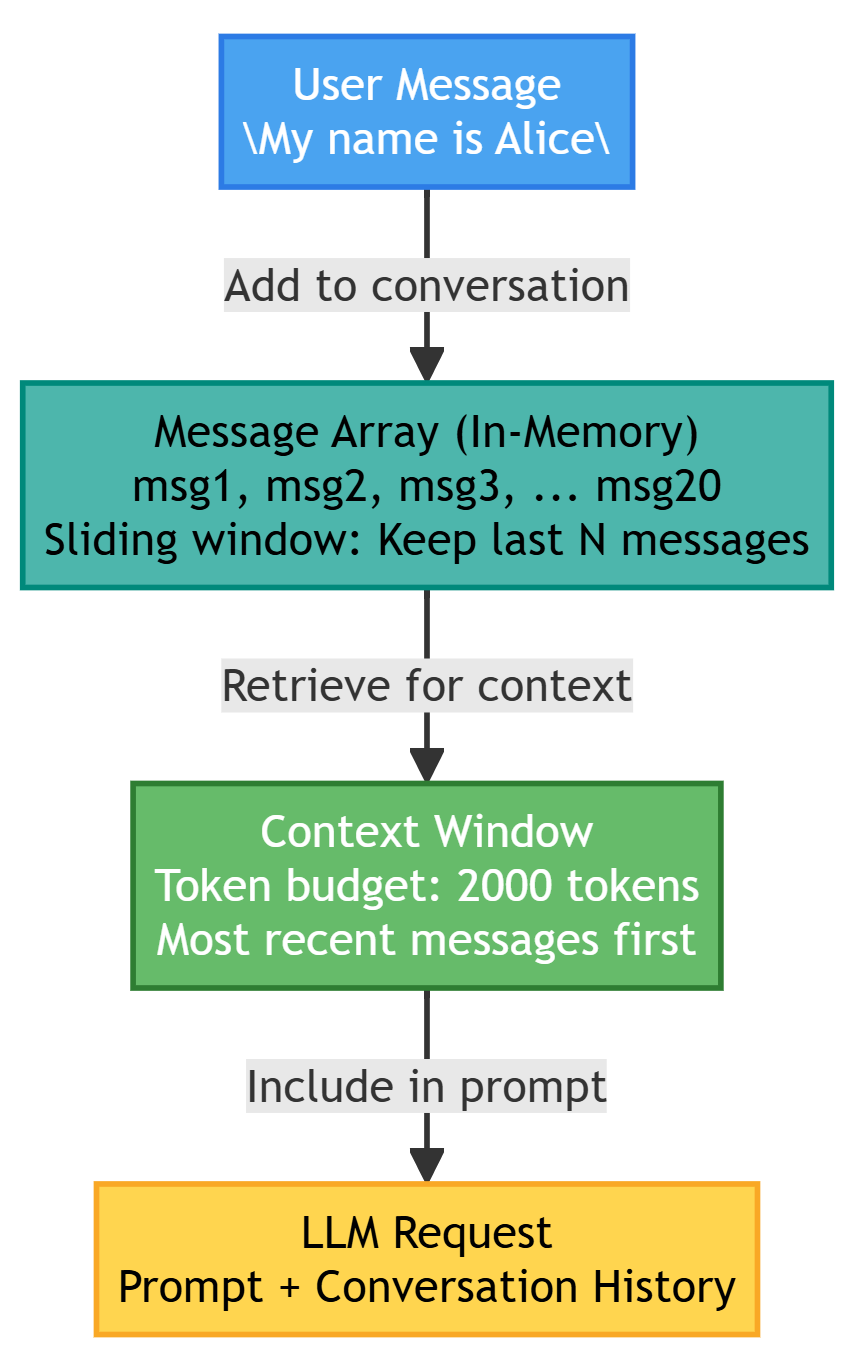
|
Duration Session only |
Size 10–50 messages |
Storage In-memory array |
|
Speed Microseconds |
Use Case Current conversation flow |
Cost Free (memory only) |
Short-term memory is what most people think of when they imagine an agent “remembering” things. It’s the running conversation—what the user said, what the agent responded, what actions were taken, what results came back.
This memory type is ephemeral by design. When the session ends, it disappears. Start a new conversation tomorrow, and the slate is clean. This matches how you’d interact with a colleague during a single meeting—you maintain context throughout the discussion, but you don’t recall every word when you meet again next week.
Why it matters: Without short-term memory, agents can’t handle multi-turn interactions. Every message would be treated in isolation. The user says “My name is Alice,” then asks “What’s my name?” and the agent has no idea because it already forgot the first message.
The implementation challenge: You need to keep enough history for context but not so much that you overflow the LLM’s token limit. A conversation that’s been running for an hour might have hundreds of messages. You can’t send all of them with every request.
Implementation:
class ShortTermMemory:
    """Working memory for current conversation."""

    def __init__(self, max_messages: int = 20):
        self.messages: list[dict] = []
        self.max_messages = max_messages

    def add_message(self, role: str, content: str):
        """Add message to conversation history."""
        self.messages.append({
            "role": role,
            "content": content,
            "timestamp": datetime.now()
        })

        # Prune old messages if exceeding limit
        if len(self.messages) > self.max_messages:
            self.messages = self.messages[-self.max_messages:]

    def get_context(self, max_tokens: int = 4000) -> list[dict]:
        """
        Retrieve conversation context within token budget.
        """
        context = []
        token_count = 0

        # Start from most recent messages
        for msg in reversed(self.messages):
            msg_tokens = count_tokens(msg["content"])

            if token_count + msg_tokens > max_tokens:
                break

            context.insert(0, msg)
            token_count += msg_tokens

        return context
The max_messages limit (20 in this example) is your first line of defense against unbounded growth. Once you exceed this limit, old messages get discarded. You’re keeping a sliding window of recent conversation.
Why start from the end when retrieving? Because recent context matters more than old context. If you have a 50-message conversation and can only fit 15 messages in your token budget, you want the most recent 15, not the oldest 15.
The token budget is your second constraint. Even if you’re under the message limit, you might be over the token limit if some messages are long. The get_context method counts tokens as it builds the context list, stopping when it hits the budget.
Why insert at position 0? Because you’re iterating backward through messages but need to return them in chronological order. Each message gets inserted at the front of the result list, maintaining correct order.
Trade-offs to consider: A larger max_messages value gives more context but uses more tokens (and costs more money). A smaller value saves tokens but might lose important context. The right number depends on your use case—quick Q&A might only need 10 messages, while complex task execution might need 50.
Use cases:
- Chat applications
- Task execution within a session
- Contextual follow-up questions
Example:
memory = ShortTermMemory()

# Turn 1
memory.add_message("user", "My name is Alice")
memory.add_message("assistant", "Nice to meet you, Alice!")

# Turn 2
memory.add_message("user", "What's my name?")
# Agent can retrieve: "Alice" from memory.get_context()
This example shows the basic pattern. The user introduces themselves, the agent acknowledges, then the user tests whether the agent remembers. Because both messages are in short-term memory, the agent can retrieve them and answer correctly.
What happens without short-term memory: The agent would respond to “What’s my name?” with something like “I don’t have information about your name.” Each interaction would be independent, making conversation impossible.
What happens when memory fills up: If you have max_messages=20 and you’re on message 25, the first 5 messages get discarded. If those early messages contained important context (like the user’s name), that information is lost unless you’ve moved it to long-term memory.
Production considerations: Most real systems implement some form of message summarization or selective retention. Instead of just dropping old messages, you might summarize them into a condensed form and keep that summary. Or you might identify “important” messages (user preferences, key decisions) and preserve those while dropping routine back-and-forth.
The code shown here is the foundation. Production implementations add sophistication on top of this basic pattern.
Long-Term Memory (Persistent Memory)
Purpose: Retain information across sessions
Characteristics:
- Persistent (stored in database/vector store)
- Facts, preferences, historical interactions
- Searchable and retrievable
- Grows over time
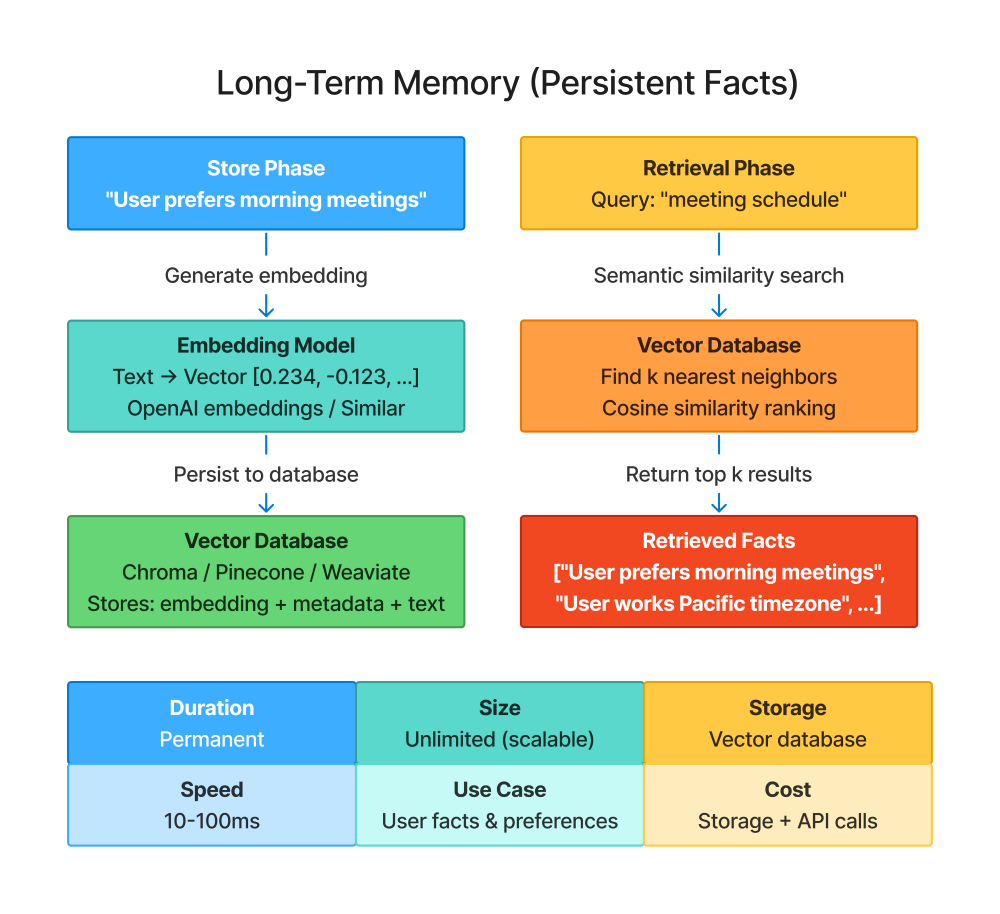
Long-term memory is what makes an agent feel like it knows you. It’s the difference between talking to a stranger every time versus talking to someone who remembers your preferences, your past conversations, and your context.
Unlike short-term memory, which disappears when the session ends, long-term memory persists. You tell the agent you prefer morning meetings on Monday. On Friday, when you ask it to schedule something, it remembers that preference. Close the app, come back next month, and it still knows.
The fundamental problem: LLMs don’t have persistent state. Each API call is independent. If you want the agent to remember something across sessions, you have to store it somewhere external—a database, a file, a vector store—and retrieve it when relevant.
Why vector stores? Because you need semantic search. Traditional databases are great for exact matches (“find the user with ID 12345”) but poor at conceptual matches (“what do I know about this user’s meeting preferences?”). Vector stores let you search by meaning, not just keywords.
How it works: When you store information, the text gets converted to an embedding—a numerical vector that represents its semantic meaning. Later, when you query, your query also becomes an embedding. The vector store finds the stored embeddings most similar to your query embedding, returning the corresponding text.
This means you can ask “meeting schedule” and retrieve “User prefers morning meetings” even though the word “schedule” doesn’t appear in the stored fact. The concepts are related, so the embeddings are close in vector space.
Implementation:
from langchain.vectorstores import Chroma
from langchain.embeddings import OpenAIEmbeddings

class LongTermMemory:
    """Persistent memory across conversations."""

    def __init__(self, user_id: str):
        self.user_id = user_id
        self.embeddings = OpenAIEmbeddings()
        self.vectorstore = Chroma(
            collection_name=f"memory_{user_id}",
            embedding_function=self.embeddings
        )

    def store(self, content: str, metadata: dict = None):
        """
        Store information in long-term memory.
        """
        doc_metadata = {
            "user_id": self.user_id,
            "timestamp": datetime.now().isoformat(),
            **(metadata or {})
        }

        self.vectorstore.add_texts(
            texts=[content],
            metadatas=[doc_metadata]
        )

    def retrieve(self, query: str, k: int = 5) -> list[str]:
        """
        Retrieve relevant memories by semantic similarity.
        """
        docs = self.vectorstore.similarity_search(query, k=k)
        return [doc.page_content for doc in docs]

    def store_fact(self, fact: str, category: str):
        """Store a specific fact with categorization."""
        self.store(
            content=fact,
            metadata={"type": "fact", "category": category}
        )

    def retrieve_facts(self, category: str = None) -> list[str]:
        """Retrieve stored facts, optionally filtered by category."""
        if category:
            filter_dict = {"category": category}
            docs = self.vectorstore.get(where=filter_dict)
        else:
            docs = self.vectorstore.get(where={"type": "fact"})

        return [doc.page_content for doc in docs.get("documents", [])]
The user_id parameter ensures each user gets their own memory space. You don’t want Alice’s preferences bleeding into Bob’s agent interactions. Each user gets a separate collection in the vector store.
Metadata tracking stores additional context beyond just the content. The timestamp tells you when this information was added. The category helps with filtering. Custom metadata might include source (where this fact came from) or confidence (how sure you are it’s accurate).
The store method is generic—it saves any text with optional metadata. This is your low-level storage interface.
The retrieve method uses semantic similarity search. You provide a query, it returns the k most relevant pieces of information. The parameter k=5 means “give me the top 5 matches.” Adjust this based on how much context you need versus how much token budget you have.
The store_fact and retrieve_facts methods are convenience wrappers for a common pattern: storing categorized facts. Preferences, projects, personal details—these are discrete pieces of information worth tracking separately.
Why separate store_fact from store? Because facts benefit from structured categorization. When you later ask “what projects is this user working on?” you can filter by category=“projects” rather than doing semantic search and hoping the right information comes back.
Use cases:
- User preferences and settings
- Learned behaviors
- Historical context
- Personalization
User preferences are the most obvious use case. “I prefer emails over Slack” or “I work Pacific time” or “I’m vegetarian.” Store these once, use them forever.
Learned behaviors emerge from interaction patterns. If the user always asks for detailed explanations rather than summaries, that’s worth remembering. If they consistently reject certain types of suggestions, that’s a learned preference.
Historical context includes past projects, previous decisions, or important events. “User launched a product in Q3 2024” might be relevant months later when discussing Q4 planning.
Personalization is the cumulative effect of all this memory. The agent doesn’t just execute tasks—it executes them in a way aligned with your preferences, informed by your history, and contextualized by your current projects.
Example:
ltm = LongTermMemory(user_id="alice_123")

# Session 1
ltm.store_fact("User prefers morning meetings", category="preferences")
ltm.store_fact("User works on Q4 budget analysis", category="projects")

# Session 2 (days later)
prefs = ltm.retrieve("meeting schedule")
# Returns: ["User prefers morning meetings"]
Session 1: The user mentions their preferences in conversation. The agent extracts key facts and stores them in long-term memory. These get saved to the vector store with appropriate categorization.
Session 2: Days later, in a completely new conversation, the user asks to schedule something. The agent queries long-term memory with “meeting schedule.” The semantic search finds “User prefers morning meetings” even though the exact words don’t match. The agent uses this to schedule appropriately.
What makes this work: The persistence across sessions. Without long-term memory, the agent would ask about meeting preferences every single time. With it, the agent remembers from the first time you mentioned it.
Common pitfalls:
Storing too much: Not everything deserves long-term storage. Routine greetings, transient task updates, or one-off questions don’t need persistence. You’re paying for storage and retrieval costs—be selective.
Storing too little: Missing important facts frustrates users. If someone tells you they’re allergic to peanuts, that better be in long-term memory. If they mention they’re working on a critical project, that’s worth storing.
Retrieval relevance: Semantic search isn’t perfect. Sometimes it returns information that’s conceptually similar but contextually wrong. Always review retrieved memories for actual relevance before using them.
Stale data: Long-term memory grows indefinitely. The user’s preferences from two years ago might not reflect their current preferences. Production systems need mechanisms for expiring or updating old information.
Privacy concerns: You’re persistently storing information about users. This has privacy implications. Users should be able to view, edit, and delete their long-term memory. GDPR and similar regulations may apply.
The implementation shown here is foundational. Production systems add versioning (tracking how facts change over time), confidence scoring (how sure are we this is still true?), and user controls (let users manage their stored data).
Episodic Memory (Event Memory)
Purpose: Remember specific events or interactions
Characteristics:
- Time-ordered sequence of events
- Contextual (who, what, when, where)
- Narrative structure
- Useful for learning from past experiences
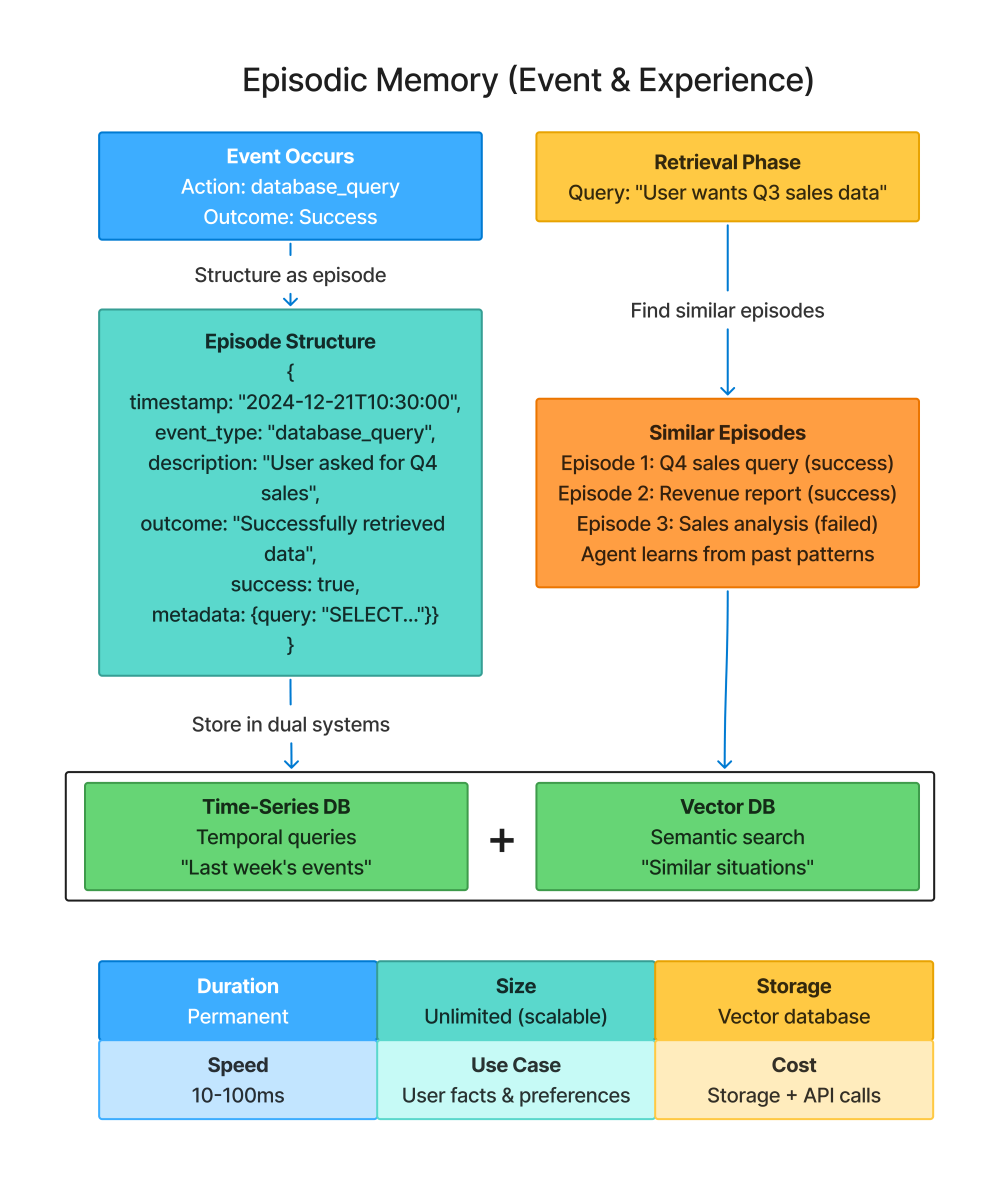
Episodic memory stores specific experiences—things that happened at particular moments in time. It’s different from long-term memory, which stores facts (“User prefers morning meetings”), in that it stores events (“On Monday, we scheduled a meeting at 9am, and the user was satisfied with that time”).
Why this matters: Agents can learn from experience. If a particular approach worked well last time, the agent can recognize a similar situation and use that approach again. If something failed repeatedly, the agent can avoid that pattern.
Think of it like your own memory of events. You don’t just remember that you like Italian food (a fact)—you remember that great dinner at that restaurant last month (an episode). The episode has context: when it happened, who was there, what made it memorable, how it turned out.
The key difference from long-term memory: Long-term memory is about what’s true. Episodic memory is about what happened. Long-term memory answers “What does this user like?” Episodic memory answers “What did we try before and how did it work out?”
When episodic memory becomes powerful: When the agent encounters similar situations repeatedly. If you’re building a customer support agent, it might handle hundreds of refund requests. Remembering how past refund requests went—which approaches worked, which failed, what edge cases appeared—makes the agent better at handling new ones.
Implementation:
from dataclasses import dataclass
from datetime import datetime

@dataclass
class Episode:
    """A memorable event or interaction."""
    timestamp: datetime
    event_type: str
    description: str
    outcome: str
    success: bool
    metadata: dict

class EpisodicMemory:
    """Memory of specific events and their outcomes."""

    def __init__(self, user_id: str):
        self.user_id = user_id
        self.episodes: list[Episode] = []
        self.db = get_database_connection()

    def record_episode(
        self,
        event_type: str,
        description: str,
        outcome: str,
        success: bool,
        **metadata
    ):
        """
        Record a specific episode.
        """
        episode = Episode(
            timestamp=datetime.now(),
            event_type=event_type,
            description=description,
            outcome=outcome,
            success=success,
            metadata=metadata
        )

        self.episodes.append(episode)
        self._persist_to_db(episode)

    def retrieve_similar_episodes(
        self,
        current_situation: str,
        k: int = 3
    ) -> list[Episode]:
        """
        Find past episodes similar to current situation.

        Useful for: "Have I seen this before? How did it go?"
        """
        # Use semantic similarity on descriptions
        similar = self.vectorstore.similarity_search(
            current_situation,
            k=k,
            filter={"user_id": self.user_id}
        )

        return [self._episode_from_doc(doc) for doc in similar]

    def get_success_rate(self, event_type: str) -> float:
        """
        Calculate success rate for a type of event.

        Useful for: "How often does this strategy work?"
        """
        episodes = [e for e in self.episodes if e.event_type == event_type]

        if not episodes:
            return 0.0

        successes = sum(1 for e in episodes if e.success)
        return successes / len(episodes)
The Episode dataclass captures everything relevant about a specific event: when it happened (timestamp), what type of event it was (event_type), what the situation was (description), what resulted (outcome), whether it succeeded (success), and any additional context (metadata).
Why capture success/failure explicitly? Because this lets you learn patterns. If database_query episodes succeed 90% of the time but refund_request episodes only succeed 60% of the time, that tells you something. Maybe refund requests need more careful handling.
The event_type categorization lets you group similar episodes. All database queries are one type. All refund requests are another. This enables both filtering (“show me past database queries”) and analysis (“what’s my success rate with email-sending tasks?”).
The description field is where semantic search happens. You store “User asked for Q4 sales data” as the description. Later, when facing “User wants Q3 revenue numbers,” semantic similarity recognizes these as related situations.
The metadata dictionary captures arbitrary additional context. For a database query, you might store the actual SQL. For a refund request, you might store the refund amount and reason. This context helps you understand not just that something happened, but the specifics of how.
Recording episodes happens automatically as the agent works. Every time it completes an action—tool call, task completion, user interaction—you can record that as an episode. The agent doesn’t need to explicitly decide what’s memorable; you build recording into the workflow.
Retrieving similar episodes uses the same semantic search as long-term memory. The current situation gets compared against past episode descriptions. The most similar ones come back, giving the agent context: “I’ve seen something like this before. Here’s what I did and how it went.”
The success rate calculation enables meta-learning. The agent can ask “How often do database queries succeed?” If the rate is low, maybe there’s a systemic problem with the database tool. If it’s high, that’s a reliable approach to prioritize.
Use cases:
- Learning from past errors
- Recognizing patterns
- Avoiding repeated mistakes
- Referencing past solutions
Learning from past errors: If the agent tried to process a refund three times and it failed each time because the order was too old, recording those episodes prevents the fourth attempt. The agent can check “Have I tried this before?” and see “Yes, and it always fails for old orders.”
Recognizing patterns: Maybe API calls to a particular service fail frequently on weekends. Episodic memory captures this pattern. When it’s Saturday and the agent is about to call that API, it can check historical success rates and perhaps wait until Monday.
Avoiding repeated mistakes: Users get frustrated when they have to correct the same mistake multiple times. If a user previously clarified “When I say ‘the team,’ I mean the engineering team specifically,” that’s an episode. Next time you see “the team” in ambiguous context, check episodes for clarification.
Referencing past solutions: Complex problems often reappear. If the agent successfully debugged a similar error last month, retrieving that episode provides a template: “Last time this happened, I tried X and Y, then discovered the issue was Z.”
Example:
em = EpisodicMemory(user_id="alice_123")

# Record successful interaction
em.record_episode(
    event_type="database_query",
    description="User asked for Q4 sales data",
    outcome="Successfully retrieved and formatted sales report",
    success=True,
    query="SELECT * FROM sales WHERE quarter='Q4'"
)

# Later: Similar situation arises
similar = em.retrieve_similar_episodes("user wants Q3 sales data")
# Returns past Q4 sales episode → Agent can adapt that approach
Recording the episode: After successfully handling a sales data request, the agent records what happened. The description captures the user’s intent. The outcome captures what the agent did. The success flag marks this as a positive example. The metadata stores the actual SQL query for reference.
Later retrieval: When a similar request appears (“user wants Q3 sales data”), the agent queries episodic memory. Semantic search finds the Q4 sales episode because “Q3 sales data” and “Q4 sales data” are semantically similar.
Using the retrieved episode: The agent sees “Last time someone asked for quarterly sales, I used this SQL query pattern and it worked.” It can adapt that query: change WHERE quarter=‘Q4’ to WHERE quarter=‘Q3’, execute it, and likely succeed because the pattern proved reliable.
Why this is powerful: The agent isn’t just blindly repeating actions. It’s learning “This type of situation calls for this type of approach, and here’s evidence it works.” Over time, the agent accumulates experience that makes it more effective.
Production considerations:
Storage growth: Episodes accumulate quickly. A busy agent might record hundreds per day. You need strategies for managing this: archiving old episodes, aggregating similar ones, or pruning low-value records.
Retrieval speed: Searching through thousands of episodes needs to be fast. Vector stores help, but you might also want indexing by event_type or time ranges to narrow search spaces before semantic similarity kicks in.
Privacy and retention: Episodes might contain sensitive information (user data, business logic, error details). Apply the same privacy considerations as long-term memory: user controls, data retention policies, anonymization where appropriate.
False patterns: With enough episodes, you’ll find spurious correlations. “Every time we did X on Tuesday, it failed” might be coincidence, not causation. Be cautious about acting on patterns without understanding why they exist.
Combining with other memory types: Episodic memory works best alongside short-term and long-term memory. Short-term gives immediate context, long-term gives persistent facts, and episodic gives learned patterns from experience. Use all three together for the most capable agents.
The implementation shown here is foundational. Production systems might add confidence scoring (how similar does an episode need to be to be relevant?), temporal decay (recent episodes matter more than old ones), and explicit pattern extraction (convert repeated successful episodes into general rules).
Memory Architecture Comparison
| Memory Type | Duration | Size | Use Case | Implementation |
|---|---|---|---|---|
| Short-Term | Session | 10-50 messages | Current conversation | List/Array |
| Long-Term | Permanent | Unlimited | User facts, preferences | Vector DB |
| Episodic | Permanent | Moderate | Past events, learnings | Time-series DB + Vector DB |
This table summarizes the key differences between memory types, helping you choose the right one for each piece of information.
Duration tells you how long the memory lasts. Short-term memory is ephemeral—it exists only during the current session and disappears when the user closes the conversation. Long-term and episodic memories persist indefinitely, surviving across sessions, days, or even years.
The implication: use short-term for anything that’s only relevant right now. Use long-term and episodic for anything you’ll need later.
Size indicates typical storage capacity. Short-term memory is deliberately constrained to 10-50 messages because you’re feeding it into the LLM’s context window on every request. Larger would exceed token limits or become prohibitively expensive.
Long-term memory is unlimited in principle—vector databases can scale to millions of entries. But practical limits exist: retrieval gets slower with more data, storage costs money, and the agent can only use a handful of retrieved facts at a time anyway.
Episodic memory is moderate-sized because you’re storing structured events, not arbitrary text. Each episode has a fixed schema (timestamp, type, description, outcome, success, metadata). You might accumulate thousands of episodes over time, but this is manageable with proper indexing.
Use case defines what each memory type is for:
Short-term handles the immediate conversation. User messages, agent responses, and the back-and-forth flow. Without this, you can’t have multi-turn interactions—the agent wouldn’t remember what was said three messages ago.
Long-term stores persistent facts about the user. Preferences (“I prefer morning meetings”), personal details (“I work in sales”), and project context (“I’m working on Q4 budget analysis”). These are timeless facts that remain true across sessions.
Episodic captures past events and what the agent learned from them. “Last week, we tried approach X for problem Y and it worked” or “Three times this month, API calls to service Z failed on weekends.” This is experiential learning.
Implementation shows the technical foundation for each type:
Short-term uses simple in-memory data structures—lists or arrays. You’re just appending messages and trimming old ones when you exceed limits. No database needed. This is fast, simple, and sufficient because it’s temporary.
Long-term requires a vector database (Chroma, Pinecone, Weaviate, etc.) because you need semantic search. You’re not looking for exact matches—you’re finding conceptually related information. Vector embeddings enable this. Traditional SQL databases don’t work well here.
Episodic benefits from a hybrid approach: time-series databases for chronological queries (“what happened last Tuesday?”) and vector databases for semantic queries (“find similar past situations”). Some implementations use just vector stores with temporal metadata, others use dedicated time-series systems.
Choosing the right memory type:
If someone asks “What did I just say?”, that’s short-term memory—it’s in the immediate conversation history.
If someone asks “What are my meeting preferences?”, that’s long-term memory—it’s a persistent fact about the user.
If someone asks “Have we tried this before?”, that’s episodic memory—it’s asking about past experiences.
If someone says “My name is Alice”, that goes into short-term immediately (so the agent can use it in the current conversation) and might also go into long-term (so future sessions remember it).
If the agent successfully completes a task, that goes into episodic memory—you’re recording what worked for future reference.
Overlap between types:
Information often appears in multiple memory types simultaneously. “User prefers morning meetings” might be:
- In short-term memory if they just mentioned it in the current conversation
- In long-term memory as a stored preference
- Implied by episodic memory if past morning meeting scheduling attempts succeeded
This redundancy is fine—each memory type serves a different access pattern. Short-term provides it immediately. Long-term provides it persistently. Episodic provides it as learned experience.
Performance characteristics:
Short-term is fastest—it’s just reading from an in-memory array. Microseconds.
Long-term is moderate speed—vector similarity search typically takes tens to hundreds of milliseconds, depending on database size and configuration.
Episodic is similar to long-term in speed, though time-based queries can be faster if properly indexed. “Get all episodes from last week” is a simple range query. “Get episodes similar to this situation” requires semantic search.
Cost implications:
Short-term is free beyond the memory to hold the messages array. No storage costs, no API calls.
Long-term costs money for vector database storage and embedding generation. Each stored fact needs an embedding (API call to OpenAI or similar). Each retrieval does similarity search (database cost).
Episodic has similar costs to long-term, though potentially lower because you might not embed every field—just the description. Metadata can be stored as plain structured data.
Scaling characteristics:
Short-term doesn’t scale—by design. It’s bounded at 10-50 messages. This is a feature, not a limitation.
Long-term scales horizontally with your vector database. Pinecone handles billions of vectors. Chroma can be run locally for smaller deployments or hosted for larger ones.
Episodic scales similarly to long-term. The structured nature of episodes (fixed schema) makes them easier to manage at scale than arbitrary long-term facts.
When to use which:
Start with short-term only for simple chatbots. Add long-term when you need personalization across sessions. Add episodic when you need learning from experience.
Most production agents need all three eventually, but you can phase them in based on complexity:
- Phase 1: Short-term memory for basic conversational agents
- Phase 2: Short-term + long-term for personalized assistants
- Phase 3: All three for Learning, adaptive agents
The table provides a quick reference, but the real insight is understanding that these memory types complement each other. They’re not alternatives—they’re components of a complete memory system. Choose based on what you’re storing and how you need to retrieve it.
Combining Memory Types
Production pattern: Hybrid Memory System
In production, you rarely use just one memory type. You need all three working together—short-term for immediate context, long-term for persistent facts, and episodic for learned experience. The challenge is orchestrating them effectively.
A hybrid memory system manages all three types and knows when to use each. It doesn’t just store everything everywhere—it makes intelligent decisions about what goes where and how to retrieve the right information at the right time.
Why you need all three: Each memory type serves different purposes. Short-term memory alone gives you conversational flow but no persistence. Long-term memory alone gives you facts but no narrative context. Episodic memory alone gives you past experiences but no current conversation state. Combined, they create agents that feel genuinely contextual and adaptive.
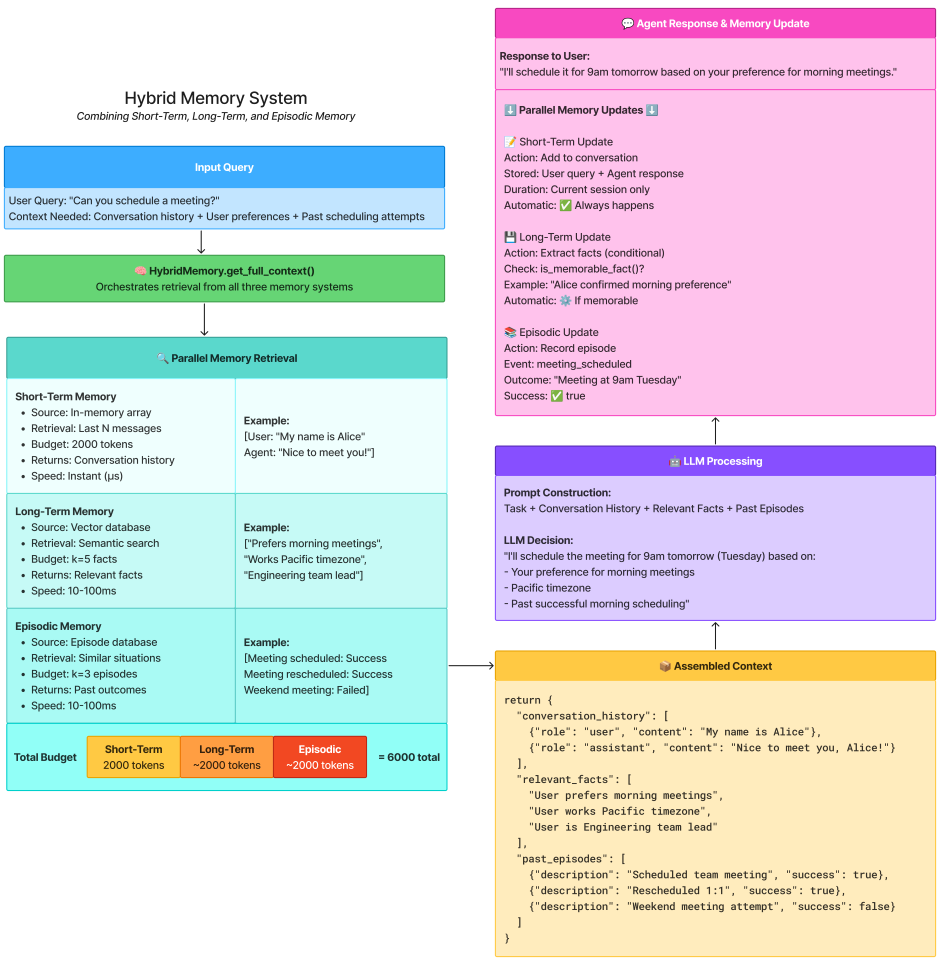
class HybridMemory:
    """
    Combines all three memory types for comprehensive context.
    """

    def __init__(self, user_id: str):
        self.short_term = ShortTermMemory(max_messages=20)
        self.long_term = LongTermMemory(user_id)
        self.episodic = EpisodicMemory(user_id)

    def get_full_context(self, current_query: str, max_tokens: int = 6000) -> dict:
        """
        Assemble comprehensive context from all memory types.
        """
        # 1. Get conversation history (short-term)
        conversation = self.short_term.get_context(max_tokens=2000)

        # 2. Retrieve relevant long-term facts
        relevant_facts = self.long_term.retrieve(current_query, k=5)

        # 3. Find similar past episodes
        similar_episodes = self.episodic.retrieve_similar_episodes(
            current_query,
            k=3
        )

        return {
            "conversation_history": conversation,
            "relevant_facts": relevant_facts,
            "past_episodes": [
                {
                    "description": ep.description,
                    "outcome": ep.outcome,
                    "success": ep.success
                }
                for ep in similar_episodes
            ]
        }

    def update_after_interaction(
        self,
        user_message: str,
        agent_response: str,
        action_taken: str,
        outcome: str,
        success: bool
    ):
        """
        Update all memory types after an interaction.
        """
        # Update short-term
        self.short_term.add_message("user", user_message)
        self.short_term.add_message("assistant", agent_response)

        # Update long-term (if fact worth remembering)
        if is_memorable_fact(user_message):
            self.long_term.store(extract_fact(user_message))

        # Update episodic
        self.episodic.record_episode(
            event_type="user_interaction",
            description=f"User: {user_message}, Agent: {action_taken}",
            outcome=outcome,
            success=success
        )
The initialization creates instances of all three memory systems. They’re independent but coordinated through this wrapper class. The user_id ensures that long-term and episodic memories are specific to this user, while short-term memory is session-specific.
The get_full_context method is where the magic happens. You call this before sending a query to the LLM, and it assembles everything the agent needs to know:
Short-term context (conversation history) gets allocated 2000 tokens. This is the immediate conversational flow—what the user just said, what the agent just responded, the last few exchanges.
Long-term facts get retrieved via semantic search on the current query. If the user asks about scheduling, you retrieve stored preferences about meeting times. If they ask about a project, you retrieve facts about that project. The k=5 parameter means you get up to 5 relevant facts.
Past episodes also use semantic search to find similar situations. The k=3 parameter means you get up to 3 relevant past experiences. These show the agent “Here’s how similar situations played out before.”
Token budget management is critical. The total budget is 6000 tokens. Short-term gets 2000. That leaves 4000 for long-term facts and episodes. You’re making tradeoffs: more conversation history means less room for facts, and vice versa. Adjust these allocations based on your use case.
Why this ordering matters: You get short-term first because it’s always relevant. You get long-term facts second because they’re persistently important. You get episodes last because they’re contextually relevant but not always necessary. If you’re over budget, episodes get truncated first.
The returned dictionary has a clear structure. Conversation history is a list of messages. Relevant facts are a list of strings. Past episodes are a list of dictionaries with description, outcome, and success fields. The LLM receives all this as part of its prompt.
The update_after_interaction method handles the reverse flow—storing new information after each interaction:
- Short-term updates happen unconditionally. Every user message and agent response gets added to conversation history. This is automatic—you always want current context.
- Long-term updates are conditional. Not everything deserves persistent storage. The
is_memorable_factfunction decides what’s worth keeping. “My name is Alice” → yes, store it. “Thanks” → no, don’t bother. Theextract_factfunction converts conversational language into storable facts. - Episodic updates record every interaction. You track what the user said, what action the agent took, what the outcome was, and whether it succeeded. This builds up experience over time.
Why separate storage logic from retrieval logic? Because the criteria are different. Retrieval needs to be fast and relevant. Storage needs to be selective and well-structured. Keeping them separate makes each easier to optimize.
Example usage in an agent loop:
memory = HybridMemory(user_id="alice_123")

# Before processing a query
context = memory.get_full_context(
    current_query="Can you schedule a meeting?",
    max_tokens=6000
)

# Build prompt with full context
prompt = f"""
Task: {current_query}

Conversation history:
{format_conversation(context['conversation_history'])}

Relevant information:
{format_facts(context['relevant_facts'])}

Past similar situations:
{format_episodes(context['past_episodes'])}

What should you do?
"""

# Get LLM response
response = llm.complete(prompt)

# After interaction
memory.update_after_interaction(
    user_message="Can you schedule a meeting?",
    agent_response="I'll schedule it for 9am based on your preference.",
    action_taken="scheduled_meeting",
    outcome="Meeting scheduled for 9am tomorrow",
    success=True
)
The agent gets full context from all memory systems. It knows the current conversation (short-term), the user’s meeting preferences (long-term), and how past meeting scheduling attempts went (episodic).
After executing, the agent updates all relevant memory systems. The conversation continues in short-term memory. If the user revealed a new preference, that goes to long-term memory. The scheduling outcome goes to episodic memory as a learning example.
Production considerations:
Memory coherence: Different memory types might contain contradictory information. Short-term might say the user wants an afternoon meeting, but long-term says they prefer mornings. You need conflict resolution strategies—typically, short-term (explicit recent request) overrides long-term (general preference).
Performance: Retrieving from three different memory systems adds latency. Each retrieval might involve database queries, vector searches, and computation. Consider caching strategies for frequently accessed information.
Token allocation: The 2000/4000 split between short-term and long-term+episodic is arbitrary. Adjust based on your use case. Chatbots need more short-term. Research agents need more episodic. Customer service agents need more long-term facts.
Selective updating: Not every interaction deserves all three memory updates. A simple “thanks” doesn’t need episodic recording. A routine query doesn’t need long-term storage. Be selective to avoid memory bloat.
User controls: Users should be able to inspect and manage their memories. What facts does the agent have stored about them? What episodes have been recorded? Can they delete information? Privacy regulations often require this.
The hybrid pattern is foundational for production agents. You might start with just short-term memory for simplicity, but adding long-term and episodic capabilities transforms the agent from a stateless responder to a contextual assistant that learns and adapts.
The code shown here is a template. Production implementations add monitoring (which memory type is being used most?), optimization (can we batch retrievals?), and fallbacks (what if retrieval fails?). But the core pattern—coordinating multiple memory types to provide comprehensive context—remains constant.
Observations vs Actions
Understanding the distinction between observations (inputs/context) and actions (outputs/executions) is critical for designing clean agent architectures.
This distinction seems obvious at first—observations are what you see, actions are what you do. But in practice, conflating these concepts leads to messy code, difficult debugging, and agents that fail in unpredictable ways.
The fundamental insight: Agents operate in a cycle. They observe the world, decide what to do, then act. Each step is distinct. If your code blurs these boundaries, you lose the ability to understand what went wrong when things break.
Think about how you debug a traditional program. You inspect variables (state), trace execution flow (logic), and examine outputs (results). With agents, observations are your variables, the decision logic is your control flow, and actions are your outputs. Keep them separate, and debugging becomes systematic. Mix them together, and you’re guessing.
Observations: The Input Space
Observations are everything the agent perceives:
class Observation:
    """What the agent can see/know."""

    def __init__(self):
        self.user_input: str = None           # What the user said
        self.tool_results: list[dict] = []    # Results from tools
        self.memory_context: dict = {}        # Retrieved memories
        self.system_state: dict = {}          # System status
        self.metadata: dict = {}              # Timestamps, costs, etc.
An observation is a snapshot of everything relevant at a particular moment. It’s the agent’s “view” of the world. The LLM doesn’t have access to your entire system—it only sees what you include in the observation.
Why structure matters: You could pass everything as one giant string to the LLM, but structured observations make downstream processing easier. You can validate that required fields exist. You can log observations for debugging. You can unit test observation construction separately from the rest of the agent.
What to include: Only what’s necessary for decision-making. If you include irrelevant information, you waste tokens and might confuse the LLM. If you exclude critical information, the agent can’t make good decisions.
Types of observations:
1. User Input
obs.user_input = "Find competitors for our product"This is the most obvious observation—what the user just said or asked. In a chat application, it’s the current message. In an automated system, it might be an event trigger or API call.
Why it’s structured: The user input might be text, but it’s explicitly marked as user input rather than, say, a tool result or memory retrieval. This distinction matters when constructing prompts—you want the LLM to know “this is what the human wants” versus “this is context from past interactions.”
2. Tool Execution Results
obs.tool_results = [
    {
        "tool": "web_search",
        "query": "top SaaS competitors 2024",
        "results": [...]
    }
]
When a tool executes, its results become part of the next observation. The agent took an action (calling web_search), got a result, and now needs to observe what came back.
Why this is an observation, not an action: The action was calling the tool. The observation is what the tool returned. The agent doesn’t control tool results—it only observes them and decides what to do next.
Structure includes context: Note that we’re storing which tool was called and with what parameters. When the agent sees tool results, it needs context: “These search results came from querying ‘top SaaS competitors 2024’.” Otherwise, the results are meaningless data.
3. Memory Retrievals
obs.memory_context = {
    "product": "Project management SaaS",
    "target_market": "SMBs",
    "past_research": "Researched Asana in Q3"
}
Memory retrievals are observations because the agent is perceiving information from its memory systems. It asked “what do I know about this user’s product?” and got back these facts.
Why memory is observation, not state: The agent’s decision loop doesn’t maintain persistent state—it retrieves state from memory systems when needed. Each iteration, memory retrieval happens fresh. The observation contains what was retrieved this time.
Selective inclusion: You don’t dump all of memory into every observation. You retrieve relevant memories (via semantic search or other mechanisms) and include only what’s pertinent to the current query.
4. System State
obs.system_state = {
    "iteration": 3,
    "tokens_used": 1250,
    "cost_so_far": 0.05,
    "time_elapsed": 12.5
}
System state tells the agent about its own execution context. “You’re on iteration 3 of 10.” “You’ve used 1250 tokens so far.” “This task has been running for 12.5 seconds.”
Why this matters: The agent can make meta-decisions based on system state. If it’s on iteration 9 of 10, it might choose a simpler approach to finish quickly. If cost is approaching the budget limit, it might avoid expensive operations.
Self-awareness through observation: By including system state in observations, you give the agent self-awareness. It can reason about its own resource usage and execution progress.
Actions: The Output Space
Actions are what the agent can do:
class Action:
    """What the agent can execute."""

    def __init__(self):
        self.type: ActionType = None        # Type of action
        self.tool_name: str = None          # Which tool (if tool call)
        self.arguments: dict = {}           # Tool arguments
        self.reasoning: str = ""            # Why this action
Actions are the agent’s output. After processing observations, the agent decides what to do next and expresses that as a structured action.
Why explicit action objects: You could have the LLM output free-form text describing what it wants to do, then parse that text to figure out the action. But structured actions are more reliable. The LLM generates structured output (via function calling or JSON mode), and you get unambiguous actions.
The reasoning field matters: Including why the agent chose this action helps with debugging and improves model performance. The LLM that explains its reasoning makes better decisions (chain-of-thought effect) and gives you visibility into its logic.
Types of actions:
1. Tool Invocation
action = Action(
    type=ActionType.TOOL_CALL,
    tool_name="web_search",
    arguments={"query": "project management software competitors"},
    reasoning="Need to find current market competitors"
)
The most common action type—calling one of the agent’s available tools. The action specifies which tool and what arguments to pass.
Structured arguments: Arguments are a dictionary, not a string. This ensures type safety and makes execution straightforward. You’re not parsing natural language to figure out arguments—you have structured data ready to pass to the tool function.
Explicit reasoning: “Need to find current market competitors” explains why this tool was chosen. If this action fails or produces poor results, you can review the reasoning to understand the agent’s logic.
2. Final Answer
action = Action(
    type=ActionType.FINAL_ANSWER,
    content="Based on research, top 3 competitors are Asana, Monday.com, and ClickUp",
    reasoning="Sufficient information gathered to answer"
)
When the agent has enough information to respond to the user’s original query, it generates a final answer action. This signals that the task is complete.
No tool execution needed: Final answers don’t execute tools—they just package the response. The action itself IS the deliverable.
Reasoning shows confidence: “Sufficient information gathered” tells you the agent believes it has adequately researched the topic. If the reasoning said “Limited data available, providing best guess,” you’d know the answer might be incomplete.
3. Clarification Request
action = Action(
    type=ActionType.CLARIFY,
    question="What specific aspect of competitors interests you: pricing, features, or market share?",
    reasoning="Query too broad, need more specific direction"
)
Sometimes the agent realizes it needs more information from the user before proceeding. Instead of guessing or making assumptions, it asks for clarification.
Better than proceeding blindly: An agent that asks for clarification when needed is more reliable than one that guesses. Users prefer “Can you clarify X?” over “Here’s my guess at what you meant.”
Structured as a question: The action contains the specific question to ask. This makes implementation simple—your agent loop just returns this question to the user and waits for their response.
4. Delegation (Multi-agent)
action = Action(
    type=ActionType.DELEGATE,
    agent="research_specialist",
    task="Deep dive into Asana's pricing model",
    reasoning="Specialized task better suited for research agent"
)
In multi-agent systems (covered in Module 5), one agent can delegate tasks to other specialized agents. This is an action because it’s something the agent does—passing work to another agent.
Why delegation is an action, not just a function call: Because it involves decision-making. The agent must decide which sub-agent to use, what task to delegate, and how to frame the request. These are strategic choices, not just mechanical routing.
Will be covered in detail later: Multi-agent systems have their own complexity. For now, understand that delegation is a valid action type alongside tool calls and final answers.
The Observation-Action Cycle
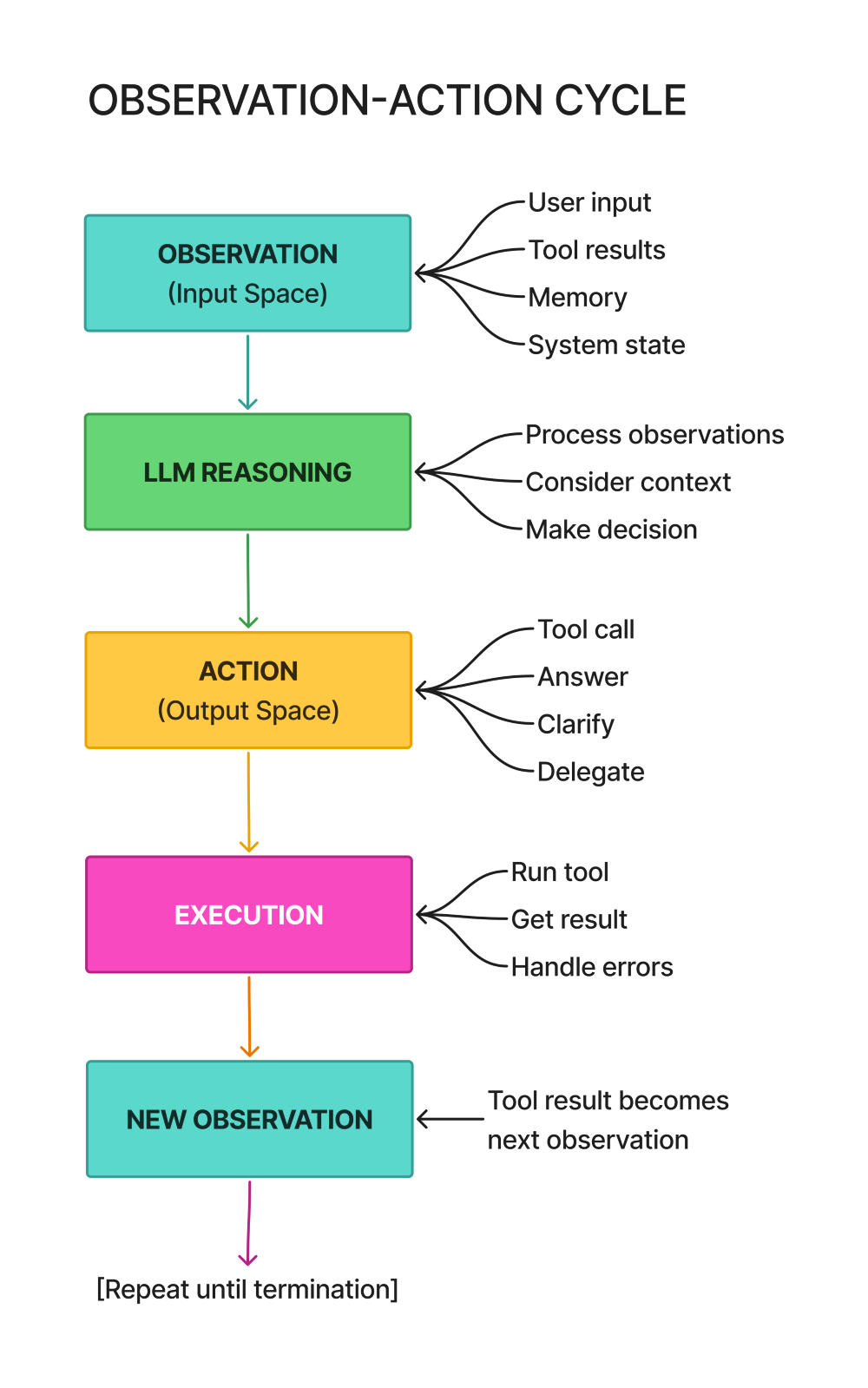
The diagram shows the fundamental cycle:
- Observe - Gather all inputs (user query, tool results, memory, system state)
- Decide - LLM processes observations and chooses an action
- Act - Execute the chosen action (call tool, respond to user, ask for clarification)
- New Observation - Action results become part of the next observation
- Repeat - Continue until task is complete
Why this cycle matters: It makes agent behavior predictable and debuggable. You always know where you are in the cycle. Observations flow in, decisions happen, actions flow out, results become observations.
Compare to mixed approaches: Some agent implementations blur this cycle. They might generate text that includes both reasoning and tool calls, or mix observations with actions in the same data structure. This works until it doesn’t—debugging becomes archaeological work.
Why This Distinction Matters
The observation-action separation isn’t academic. It solves practical problems you’ll encounter in production.
1. Debugging
# Clear separation makes debugging easier
if agent_stuck():
    print("Last observation:", observation.to_dict())
    print("Action taken:", action.to_dict())
    print("Result:", execution_result.to_dict())
    # Easy to identify where the problem is
When your agent breaks, you need to know where it broke. Did it fail at observation construction (missing critical context)? At decision-making (chose wrong action)? At action execution (tool crashed)?
With clear separation: You can inspect each piece independently. Look at the observation—did it have all necessary information? Look at the action—was the decision reasonable given the observation? Look at the result—did the tool execute correctly?
Without separation: You’re looking at a tangled mess of mixed concerns. “The agent failed” tells you nothing. “The observation was missing user context” or “The tool call used invalid arguments” tells you exactly what to fix.
Real debugging scenarios:
Agent keeps calling wrong tool: Check observations—is the tool list correctly formatted? Check actions—is the reasoning sound? Often it’s a tool description problem in the observation.
Agent gets stuck in loops: Check system state in observations—does the agent know it’s repeating itself? Check actions—is there variation or the same action repeatedly?
Tool calls fail constantly: Check action arguments—are they well-formed? Check tool results in observations—do they indicate what went wrong?
2. Testing
# Can test observation processing separately from action execution
def test_observation_processing():
    obs = Observation(user_input="What's the weather?")
    processed = agent.process_observation(obs)
    assert processed.intent == "weather_query"

def test_action_execution():
    action = Action(type=ActionType.TOOL_CALL, tool_name="get_weather")
    result = agent.execute_action(action)
    assert result.success == True
Separation enables unit testing. You can test observation construction without involving the LLM or action execution. You can test action execution without building complete observations.
Observation testing: Create synthetic observations and verify they contain expected fields. Test edge cases—what happens with empty user input? With malformed tool results? With missing memory context?
Action testing: Create synthetic actions and verify they execute correctly. Test tool calls with valid and invalid arguments. Test error handling when tools fail.
Integration testing: Then test the full cycle—observation → decision → action → new observation. But you already know the pieces work individually, so integration failures are isolated to the interfaces between components.
Test isolation benefits:
- Faster tests (don’t need full agent setup for every test)
- Clearer failures (know which component broke)
- Better coverage (can test edge cases per component)
3. Monitoring
# Track observation quality vs action effectiveness
metrics = {
    "observation_completeness": score_observation(obs),
    "action_success_rate": calculate_success(actions),
    "observation_to_action_latency": measure_latency()
}
In production, you need metrics. Observation-action separation gives you natural metric boundaries.
Observation metrics:
- Completeness: Does the observation include all expected fields?
- Size: How many tokens is the observation consuming?
- Quality: Are memory retrievals relevant? Is system state accurate?
Action metrics:
- Success rate: What percentage of actions execute successfully?
- Type distribution: Is the agent mostly calling tools, or mostly asking for clarification?
- Reasoning quality: Do action explanations make sense?
Cycle metrics:
- Latency: How long from observation to action?
- Efficiency: How many cycles to complete typical tasks?
- Patterns: Are certain observation types leading to certain actions?
Why this helps in production: You can identify bottlenecks (observations taking too long to construct), failure modes (certain action types always failing), and optimization opportunities (observations including unnecessary information).
4. Error Handling
# Different error handling for observation vs action failures

# Observation failure: Retry retrieval
if observation_incomplete(obs):
    obs = retry_observation_gathering()

# Action failure: Try alternative action
if action_failed(result):
    alternative_action = get_fallback_action()
    result = execute(alternative_action)
Different failure modes need different recovery strategies. Observation-action separation makes this explicit.
Observation failures happen when you can’t gather necessary context:
- Memory retrieval times out → Retry or proceed with partial memory
- Tool result malformed → Request structured error from tool
- User input unclear → Ask for clarification
Action failures happen during execution:
- Tool call crashes → Try alternative tool or approach
- LLM refuses to generate action → Adjust prompt and retry
- Invalid arguments → Validate and correct arguments
Separate handling strategies:
For observations, you’re usually retrying or working with partial information. The observation construction itself shouldn’t fail—you build what you can and flag what’s missing.
For actions, you’re choosing alternatives or aborting. If an action can’t execute, you don’t blindly retry—you select a different action or escalate to the user.
Example error handling flow:
# Build observation (with error tolerance)
obs = build_observation(
    user_input=user_query,
    tool_results=get_tool_results_safe(),  # Returns empty list if fails
    memory=get_memory_safe(),               # Returns empty dict if fails
    system_state=get_system_state()
)

# Note what's missing
if not obs.memory_context:
    obs.metadata["warning"] = "Memory retrieval failed"

# Decide action (might account for missing data)
action = agent.decide(obs)

# Execute action (with explicit failure handling)
try:
    result = execute_action(action)
except ToolError as e:
    # Try alternative tool
    alternative = get_alternative_tool(action.tool_name)
    if alternative:
        action.tool_name = alternative
        result = execute_action(action)
    else:
        # No alternative, inform user
        result = ActionResult(
            success=False,
            error=f"Tool {action.tool_name} failed: {e}"
        )
The pattern: Observation construction is fault-tolerant (build what you can). Action execution is fault-aware (handle failures explicitly).
Common Anti-Patterns to Avoid
Anti-pattern 1: Mixing observations with actions
# Bad: Observations and actions in one blob
agent_state = {
    "user_input": "...",
    "next_tool": "web_search",  # This is an action!
    "tool_results": [...],
    "should_respond": True       # This is also an action!
}
This makes it impossible to trace the decision boundary. Where did the observation end and the action decision begin?
Anti-pattern 2: Implicit observations
# Bad: Agent accesses context directly
def agent_decide():
    user_input = get_user_input()      # Implicit observation
    memory = query_memory()            # Implicit observation
    return generate_action(user_input, memory)
Without explicit observation objects, you can’t inspect what the agent saw, replay decisions, or test observation construction.
Anti-pattern 3: Unclear action types
# Bad: Action is just a string
action = "search web for competitors"
How do you execute this? Parse the string? Hope the format is consistent? Structured actions eliminate ambiguity.
Anti-pattern 4: Observations include action suggestions
# Bad: Observation contains hints about what to do
obs = Observation(
    user_input="Find competitors",
    suggested_action="use web_search tool"  # Don't do this!
)
The observation should be purely informational. Let the decision logic decide what action to take. Pre-suggesting actions defeats the purpose of having an agent.
Best Practices Summary
For observations:
- Include everything needed for decision-making, nothing more
- Structure data clearly (separate user input from tool results from memory)
- Make observations inspectable (can log/debug them)
- Build observations defensively (handle missing data gracefully)
For actions:
- Use explicit types (TOOL_CALL, FINAL_ANSWER, CLARIFY, etc.)
- Include reasoning (explain why this action was chosen)
- Structure arguments clearly (use dicts, not strings)
- Make actions executable (no ambiguity about what to do)
For the cycle:
- Keep observation → decision → action → result separate
- Make each transition explicit and inspectable
- Test each component independently
- Handle errors at the appropriate level (observation vs action)
The observation-action distinction is one of those patterns that seems over-engineered until you need it. When your agent works perfectly in testing but breaks mysteriously in production, you’ll be grateful for the clear boundaries that let you debug systematically rather than guessing where things went wrong.
Key Takeaway: Observations are what the agent perceives. Actions are what the agent does. Keeping these separate makes your agent debuggable, testable, and maintainable. Mix them together and you’ve created a black box that breaks in unpredictable ways.
Exercise: Build a Single-Loop Tool-Using Agent
Now let’s put everything together and build a production-ready agent using LangChain with qwen3:8b deployed on Ollama on local machine.
This exercise is where theory meets practice. You’ve learned about the agent loop, tool calling, memory types, and the observation-action cycle. Now you’re going to implement all of it in a working system.
What makes this “production-ready”: It’s not just a demo that works once. It has error handling, execution tracking, conversation memory, and metrics. These aren’t optional features—they’re what separate toys from tools that work in production.
Why Ollama instead of OpenAI: This implementation uses Ollama with the Qwen3:8b model, which runs locally on your machine. No API keys needed, no usage costs, complete privacy. The architecture and patterns are identical to cloud-based LLMs—you’re learning transferable skills while keeping everything local.
Github Codebase URL: https://github.com/ranjankumar-gh/building-real-world-agentic-ai-systems-with-langgraph-codebase/tree/main/module-02
Read README.md for further details and step-by-step instructions.
Install Python Dependencies: pip install -r requirements.txt
Exercise Overview
Goal: Build an agent that can:
- Answer questions using tools
- Maintain conversation context
- Handle errors gracefully
- Track its own execution
Tools we’ll implement:
- Calculator (for math)
- Web search (for current information)
- Weather API (for weather data)
These three tools represent different patterns you’ll encounter: deterministic computation (calculator), external API calls (weather), and information retrieval (web search). Master these and you can implement any tool.
Expected behavior:
User: "What's 15% of 2500?"
Agent: [Uses calculator] → "15% of 2500 is 375"

User: "What's the weather in Paris?"
Agent: [Uses weather API] → "Current weather in Paris is 12°C and rainy"

User: "Who won the latest Nobel Prize in Physics?"
Agent: [Uses web search] → "The 2024 Nobel Prize in Physics was
awarded to..."
Why these examples matter: The first shows tool selection (recognizing a math problem). The second shows parameter extraction (getting “Paris” from the query). The third shows information retrieval. Together, they exercise all the core capabilities.
Step 1: Setup and Dependencies
First, install Ollama and the required Python packages.
Install Ollama
Download Ollama from https://ollama.ai
Install following the instructions for your platform (Windows, macOS, or Linux)
Pull the Qwen3:8b model:
ollama pull qwen3:8bStart Ollama (usually starts automatically, but can manually run):
ollama serve
Ollama will run on http://localhost:11434 by default. The Qwen3:8b model is a capable 8-billion parameter model that works well for agent tasks while running efficiently on consumer hardware.
Install Python Dependencies
# Create and activate a virtual environment (recommended)
python -m venv env

# On Windows:
env\Scripts\activate

# On macOS/Linux:
source env/bin/activate

# Install required packages
pip install langchain langchain-core langchain-ollama python-dotenv requests pydantic
What you’re installing:
- langchain: Core LangChain library for agent framework
- langchain-core: Foundational components
- langchain-ollama: Ollama integration for LangChain
- python-dotenv: Environment variable management (optional for this setup)
- requests: HTTP library for API calls (used by tools)
- pydantic: Data validation
Project Structure
Create a directory for your project with these files:
module-02/
├── production_agent.py    # Main agent implementation
├── tools.py              # Tool definitions
└── requirements.txt      # Project dependencies
Step 2: Define Custom Tools
Create a file called tools.py. We’ll implement the three tools using LangChain’s modern @tool decorator approach. For the source code, visit the github url given at the start of the section.
"""
Tools module for LangChain agents.
Contains all tool definitions and implementations.
"""

from langchain.tools import tool

# Tool 1: Calculator
@tool
def calculator(expression: str) -> str:
    """
    Evaluate a mathematical expression.

    Args:
        expression: Mathematical expression to evaluate (e.g., '15 * 20 / 100')

    Returns:
        Result of the calculation
    """
    try:
        # Security: Only allow safe mathematical operations
        allowed_chars = set('0123456789+-*/().  ')
        if not all(c in allowed_chars for c in expression):
            return "Error: Expression contains invalid characters"

        result = eval(expression, {"__builtins__": {}}, {})
        return f"Result: {result}"

    except Exception as e:
        return f"Error: {str(e)}"

# Tool 2: Web Search (simulated)
@tool
def web_search(query: str, max_results: int = 5) -> str:
    """
    Search the web for information.

    Args:
        query: Search query
        max_results: Maximum number of results (default: 5)

    Returns:
        Search results as formatted string
    """
    # In production, integrate with actual search API
    # This is a simulation

    # Simulate API call
    simulated_results = [
        {
            "title": f"Result {i+1} for '{query}'",
            "snippet": f"This is a simulated search result about {query}...",
            "url": f"https://example.com/result{i+1}"
        }
        for i in range(min(max_results, 3))
    ]

    # Format results
    formatted = f"Search results for '{query}':\n\n"
    for i, result in enumerate(simulated_results, 1):
        formatted += f"{i}. {result['title']}\n"
        formatted += f"   {result['snippet']}\n"
        formatted += f"   {result['url']}\n\n"

    return formatted

# Tool 3: Weather API
@tool
def get_weather(city: str) -> str:
    """
    Get current weather for a city.

    Args:
        city: City name

    Returns:
        Weather information
    """
    # In production, integrate with weather API
    # This is a simulation

    import random

    temps = list(range(5, 30))
    conditions = ["Sunny", "Cloudy", "Rainy", "Partly Cloudy", "Overcast"]

    temp = random.choice(temps)
    condition = random.choice(conditions)

    return f"Current weather in {city}: {temp}°C, {condition}"

# Export tools
calculator_tool = calculator
web_search_tool = web_search
weather_tool = get_weather
The @tool decorator: This is LangChain’s modern way to define tools. Instead of manually creating schemas with Pydantic and wrapping with StructuredTool, the decorator handles everything automatically. It:
- Extracts the function signature to create the schema
- Uses the docstring for the tool description
- Uses parameter type hints for validation
- Makes the function available as a tool to the agent
Why this is better: Less boilerplate code. The function signature and docstring are the source of truth. Type hints provide automatic validation. The decorator creates a proper LangChain tool object that the agent can use.
Security validation is still critical in the calculator. We’re using eval(), which is dangerous if unconstrained. We check that the expression only contains safe characters and disable built-ins to prevent code execution attacks.
Simulated tools: The web search and weather tools use simulation data. In production, you’d integrate with actual APIs (Google Custom Search, OpenWeatherMap, etc.). The simulation lets you focus on agent architecture without dealing with API keys and rate limits.
Export aliases: The calculator_tool, web_search_tool, and weather_tool exports make imports cleaner in the main agent file.
Step 3: Build the Agent
Create a file called production_agent.py. This implements the agent with tool calling, memory, error handling, and tracking. Vist github url given at the start of the section for source code.
"""
Production-ready agent implementation using LangChain with Ollama.
"""

import os
from typing import List, Dict, Any
from datetime import datetime
from dotenv import load_dotenv

from langchain.agents import create_agent
from langchain_ollama import ChatOllama

from tools import calculator_tool, web_search_tool, weather_tool

# Load environment variables (optional for Ollama)
load_dotenv()

class ProductionAgent:
    """
    A production-ready single-loop agent with:

    - Tool calling
    - Memory management
    - Error handling
    - Execution tracking
    """

    def __init__(
        self,
        model_name: str = "qwen3:8b",
        temperature: float = 0,
        max_iterations: int = 10,
        verbose: bool = True
    ):
        self.model_name = model_name
        self.temperature = temperature
        self.max_iterations = max_iterations
        self.verbose = verbose

        # Initialize LLM with Ollama
        self.llm = ChatOllama(
            model=model_name,
            temperature=temperature
        )

        # Define tools
        self.tools = [
            calculator_tool,
            web_search_tool,
            weather_tool
        ]

        # System prompt
        self.system_prompt = f"""You are a helpful assistant with access to tools.

Use tools when necessary to provide accurate, up-to-date information.
Think step-by-step about which tool to use.

Current date: {datetime.now().strftime("%Y-%m-%d")}

Remember:

- Use calculator for any mathematical operations
- Use web_search for current events or information you don't have
- Use get_weather for weather information"""

        # Create agent graph
        self.agent_graph = create_agent(
            model=self.llm,
            tools=self.tools,
            system_prompt=self.system_prompt,
            debug=verbose
        )

        # Memory: Conversation history
        self.messages: List[Dict[str, str]] = []

        # Tracking: Execution metrics
        self.execution_log = []
Configuration parameters:
model_name: Which Ollama model to use. “qwen3:8b” is a good balance of capability and speed. You could also use “llama2”, “mistral”, or other models.temperature: Controls randomness (0 = deterministic, 1 = creative). Keep it low for production agents.max_iterations: Safety limit preventing infinite loops. 10 is reasonable for most tasks.verbose: Whether to print execution traces. Helpful for debugging.
ChatOllama vs ChatOpenAI: The only difference from cloud-based implementations is using ChatOllama instead of ChatOpenAI. Everything else—the agent loop, tool calling, memory management—works identically.
create_agent(): This is LangChain’s newer agent creation API. It builds an agent graph that handles the observe-decide-act-observe loop automatically. The graph manages tool calling, error handling, and iteration limits.
System prompt structure: Clear instructions about tool usage. The current date helps with time-sensitive queries. Explicit reminders about which tool to use for what improve tool selection accuracy.
Messages list: This is our short-term memory. Each user message and agent response gets appended, maintaining conversational context across turns.
    def run(self, user_input: str) -> dict:
        """
        Execute agent with user input.

        Returns comprehensive result including:

        - Final answer
        - Intermediate steps
        - Execution metadata
        """
        start_time = datetime.now()

        try:
            # Add user message to history
            self.messages.append({"role": "user", "content": user_input})

            # Execute agent
            inputs = {"messages": self.messages}
            result = None
            step_count = 0

            for chunk in self.agent_graph.stream(inputs, stream_mode="updates"):
                if self.verbose:
                    print(chunk)
                step_count += 1
                result = chunk

            # Extract final answer from the last AI message
            final_answer = ""
            if result and 'model' in result:
                ai_messages = result['model'].get('messages', [])
                if ai_messages:
                    last_message = ai_messages[-1]
                    if hasattr(last_message, 'content'):
                        final_answer = last_message.content
                    elif isinstance(last_message, dict):
                        final_answer = last_message.get('content', '')

            # Update message history with agent response
            if final_answer:
                self.messages.append({"role": "assistant", "content": final_answer})

            # Track execution
            execution_time = (datetime.now() - start_time).total_seconds()
            execution_record = {
                "timestamp": start_time.isoformat(),
                "input": user_input,
                "output": final_answer,
                "steps": step_count,
                "execution_time": execution_time,
                "success": True
            }
            self.execution_log.append(execution_record)

            return {
                "answer": final_answer,
                "intermediate_steps": [],  # Could parse from stream if needed
                "execution_time": execution_time,
                "success": True
            }

        except Exception as e:
            # Log error
            execution_record = {
                "timestamp": start_time.isoformat(),
                "input": user_input,
                "error": str(e),
                "success": False
            }
            self.execution_log.append(execution_record)

            return {
                "answer": f"I encountered an error: {str(e)}",
                "error": str(e),
                "success": False
            }
Streaming execution: The agent_graph.stream() method returns execution updates as they happen. Each chunk represents a step in the agent loop—thinking, tool calling, processing results. This provides real-time visibility into what the agent is doing.
Message history management: We append the user input before execution and the agent’s response after. This maintains the conversation context that the agent sees on the next turn.
Result extraction: The streaming API returns results in a specific format. We extract the final answer from the last AI message in the result. This handles the various formats the streaming API might return.
Error handling doesn’t crash: Exceptions get caught, logged, and returned as structured error responses. The agent remains operational even if a request fails.
Execution tracking: Every run gets logged with timestamp, input, output, step count, execution time, and success status. This data powers your monitoring and debugging.
    def get_execution_stats(self) -> dict:
        """Get execution statistics."""
        if not self.execution_log:
            return {"message": "No executions yet"}

        total = len(self.execution_log)
        successful = sum(1 for e in self.execution_log if e.get("success"))
        avg_time = sum(e.get("execution_time", 0) for e in self.execution_log) / total
        avg_steps = sum(e.get("steps", 0) for e in self.execution_log if "steps" in e) / total

        return {
            "total_executions": total,
            "successful": successful,
            "success_rate": successful / total,
            "avg_execution_time": avg_time,
            "avg_steps_per_execution": avg_steps
        }

    def reset_conversation(self):
        """Reset conversation history."""
        self.messages = []
        print("Conversation history reset")
Statistics provide operational visibility: How many requests? Success rate? Average latency? Average steps per task? This tells you if the agent is performing well or struggling. Production systems would expand this with per-tool metrics, cost tracking, and time-series analysis.
Step 4: Test the Agent
Add a test function to production_agent.py that exercises all capabilities:
def main():
    """Test the production agent."""

    print("=" * 60)
    print("PRODUCTION AGENT - SINGLE-LOOP WITH TOOLS")
    print("=" * 60)
    print()

    # Initialize agent
    agent = ProductionAgent(
        model_name="qwen3:8b",
        temperature=0,
        verbose=True
    )

    # Test 1: Calculator
    print("\n" + "=" * 60)
    print("TEST 1: Calculator Tool")
    print("=" * 60)

    result1 = agent.run("What is 15% of 2500?")
    print(f"\nFinal Answer: {result1['answer']}")
    print(f"Execution Time: {result1['execution_time']:.2f}s")
    print(f"Steps Taken: {len(result1.get('intermediate_steps', []))}")

    # Test 2: Weather
    print("\n" + "=" * 60)
    print("TEST 2: Weather Tool")
    print("=" * 60)

    result2 = agent.run("What's the weather like in Tokyo?")
    print(f"\nFinal Answer: {result2['answer']}")
    print(f"Execution Time: {result2['execution_time']:.2f}s")

    # Test 3: Web Search
    print("\n" + "=" * 60)
    print("TEST 3: Web Search Tool")
    print("=" * 60)

    result3 = agent.run("Who won the 2024 Nobel Prize in Physics?")
    print(f"\nFinal Answer: {result3['answer']}")
    print(f"Execution Time: {result3['execution_time']:.2f}s")

    # Test 4: Multi-turn conversation
    print("\n" + "=" * 60)
    print("TEST 4: Multi-Turn Conversation (Memory)")
    print("=" * 60)

    agent.run("My name is Alice and I live in Paris")
    result4 = agent.run("What's the weather where I live?")
    print(f"\nFinal Answer: {result4['answer']}")
    print("(Agent should remember Paris from previous message)")

    # Display statistics
    print("\n" + "=" * 60)
    print("EXECUTION STATISTICS")
    print("=" * 60)

    stats = agent.get_execution_stats()
    for key, value in stats.items():
        print(f"{key}: {value}")


if __name__ == "__main__":
    main()
Test progression:
- Calculator - Verifies tool selection for deterministic computation
- Weather - Verifies parameter extraction from natural language
- Web search - Verifies information retrieval
- Multi-turn - Verifies conversation memory across interactions
Run the tests:
python production_agent.pyExpected Output
You can refer to the detailed output in production_agent_output.txt at github url mentioned at the start of the section.
============================================================
PRODUCTION AGENT - SINGLE-LOOP WITH TOOLS
============================================================

============================================================
TEST 1: Calculator Tool
============================================================

{'model': {'messages': [AIMessage(content='', tool_calls=[{'name':
    'calculator', 'args': {'expression': '2500 * 0.15'}}])]}}
{'tools': {'messages': [ToolMessage(content='Result: 375.0',
    tool_call_id='...')]}}
{'model': {'messages': [AIMessage(content='15% of 2500 is 375.')]}}

Final Answer: 15% of 2500 is 375.
Execution Time: 2.34s
Steps Taken: 3

============================================================
TEST 2: Weather Tool
============================================================

{'model': {'messages': [AIMessage(content='', tool_calls=[{'name':
    'get_weather', 'args': {'city': 'Tokyo'}}])]}}
{'tools': {'messages': [ToolMessage(content='Current weather in
    Tokyo: 22°C, Sunny', tool_call_id='...')]}}
{'model': {'messages': [AIMessage(content='The current weather
    in Tokyo is 22°C and sunny.')]}}

Final Answer: The current weather in Tokyo is 22°C and sunny.
Execution Time: 1.87s

============================================================
TEST 3: Web Search Tool
============================================================

{'model': {'messages': [AIMessage(content='', tool_calls=[{'name':
    'web_search', 'args': {'query': '2024 Nobel Prize Physics winner'}}])]}}
{'tools': {'messages': [ToolMessage(content='Search results for 2024
    Nobel Prize Physics winner...', tool_call_id='...')]}}
{'model': {'messages': [AIMessage(content='Based on the search results...')]}}

Final Answer: Based on the search results, the 2024 Nobel Prize in
    Physics was awarded to...
Execution Time: 2.15s

============================================================
TEST 4: Multi-Turn Conversation (Memory)
============================================================

{'model': {'messages': [AIMessage(content='Nice to meet you,
    Alice! I noted that you live in Paris.')]}}

{'model': {'messages': [AIMessage(content='',
    tool_calls=[{'name': 'get_weather', 'args': {'city': 'Paris'}}])]}}
{'tools': {'messages': [ToolMessage(content='Current
    weather in Paris: 15°C, Cloudy', tool_call_id='...')]}}
{'model': {'messages': [AIMessage(content=
    'The weather in Paris is currently 15°C and cloudy.')]}}

Final Answer: The weather in Paris is currently 15°C and cloudy.
(Agent should remember Paris from previous message)

============================================================
EXECUTION STATISTICS
============================================================
total_executions: 5
successful: 5
success_rate: 1.0
avg_execution_time: 2.08
avg_steps_per_execution: 2.4
What you’re seeing in the output:
Model updates show when the LLM generates responses. You’ll see tool calls with function names and arguments, and final text responses.
Tool updates show when tools execute and return results. Each tool call produces a ToolMessage with the tool’s output.
Multiple steps per query are normal. The agent might: (1) decide to call a tool, (2) call the tool, (3) process the result, (4) generate final answer. That’s 4 steps.
The streaming format shows the agent’s thought process. In verbose mode, you see each decision point and action. This is invaluable for debugging.
Adding Custom Tools
To add your own tools, follow the same pattern in tools.py:
from langchain.tools import tool

@tool
def your_custom_tool(param1: str, param2: int = 10) -> str:
    """
    Brief description of what your tool does.

    Args:
        param1: Description of first parameter
        param2: Description of second parameter (default: 10)

    Returns:
        Description of return value
    """
    # Your implementation
    result = f"Processed {param1} with {param2}"
    return result

# Export
your_custom_tool_export = your_custom_tool
Then import and add to the agent’s tool list in production_agent.py:
from tools import calculator_tool, web_search_tool, weather_tool, your_custom_tool_export

# In ProductionAgent.__init__:
self.tools = [
    calculator_tool,
    web_search_tool,
    weather_tool,
    your_custom_tool_export
]
That’s it. The @tool decorator handles schema creation, validation, and integration. The agent automatically knows about the new tool and can use it.
Extension Challenges
Challenge 1: Implement Retry Logic
Add exponential backoff for failed tool calls:
import time

def execute_with_retry(tool_func, max_retries=3, **kwargs):
    """Execute tool with exponential backoff retry."""
    for attempt in range(max_retries):
        try:
            return tool_func(**kwargs)
        except Exception as e:
            if attempt == max_retries - 1:
                raise
            wait_time = 2 ** attempt
            print(f"Attempt {attempt + 1} failed, retrying in {wait_time}s...")
            time.sleep(wait_time)
Challenge 2: Add Cost Tracking
Track token usage and estimated costs:
class ProductionAgent:
    def __init__(self, ...):
        # Add cost tracking
        self.total_tokens = 0
        self.total_cost = 0.0

    def track_usage(self, input_tokens, output_tokens):
        """Track token usage and costs."""
        self.total_tokens += input_tokens + output_tokens
        # Ollama is free, but this shows the pattern
        # For OpenAI: cost = (input_tokens * 0.03 + output_tokens * 0.06) / 1000
        self.total_cost += 0  # Free with Ollama!
Challenge 3: Add Tool Permissioning
Require approval for certain tools:
RESTRICTED_TOOLS = ["send_email", "delete_file"]

def check_permission(tool_name):
    """Check if tool requires approval."""
    if tool_name in RESTRICTED_TOOLS:
        approval = input(f"Tool '{tool_name}' requires approval. Proceed? (y/n): ")
        return approval.lower() == 'y'
    return True
Challenge 4: Integrate Real APIs
Replace simulated tools with actual API calls:
@tool
def weather_api(city: str) -> str:
    """Get real weather data from OpenWeatherMap."""
    import requests

    api_key = os.getenv("OPENWEATHER_API_KEY")
    url = f"http://api.openweathermap.org/data/2.5/weather?q={city}&appid={api_key}&units=metric"

    response = requests.get(url)
    data = response.json()

    temp = data['main']['temp']
    condition = data['weather'][0]['description']

    return f"Current weather in {city}: {temp}°C, {condition}"
Challenge 5: Add Structured Logging
import logging
import json

class AgentLogger:
    def __init__(self):
        self.logger = logging.getLogger("agent")
        handler = logging.FileHandler("agent_execution.log")
        handler.setFormatter(logging.Formatter(
            '{"timestamp": "%(asctime)s", "level": "%(levelname)s", "message": %(message)s}'
        ))
        self.logger.addHandler(handler)

    def log_execution(self, step, data):
        self.logger.info(json.dumps({"step": step, "data": data}))
Why this matters: Production logs need to be machine-readable. JSON logs can be ingested by log aggregation systems (Datadog, Splunk, CloudWatch) for analysis.
Implementation hint: Add logging at key points: before LLM calls, before tool execution, on errors, on completion. Include request IDs to trace full execution paths.
What You’ve Built
You now have a working agent with:
- Tool calling - Three tools demonstrating different patterns
- Conversation memory - Short-term memory via message history
- Error handling - Graceful failures that don’t crash
- Execution tracking - Metrics and logs for monitoring
- Local execution - No API keys, no costs, complete privacy
- Extensibility - Clear patterns for adding more tools
This is the foundation. Production agents add more sophisticated memory (long-term, episodic), better error recovery, cost controls (for cloud LLMs), and safety mechanisms. But the core architecture—the agent loop, tool abstraction, memory management—is what you’ve built here.
Troubleshooting
Ollama connection errors:
- Verify Ollama is running:
ollama serve - Check the model is available:
ollama list - Test the model directly:
ollama run qwen3:8b "Hello"
Import errors:
- Verify virtual environment is activated
- Reinstall dependencies:
pip install -r requirements.txt - Check Python version:
python --version(needs 3.8+)
Tools not being called:
- Check tool descriptions—make them specific
- Add examples to the system prompt
- Enable verbose mode to see what the agent is thinking
Memory not working:
- Verify messages list is being updated after each turn
- Check that messages are passed to the agent graph
- Print the messages list to inspect contents
Slow execution:
- Ollama models run on CPU by default (slower than GPU)
- Consider smaller models like “qwen3:4b” for speed
- Or larger models like “qwen3:14b” for capability (if you have RAM)
Next Steps
Extend the agent further:
- Add database query tools
- Integrate file system operations
- Connect to real APIs (weather, news, search)
- Implement long-term memory with vector databases
Improve the architecture:
- Add streaming responses for better UX (already added in the recent version of the code)
- Implement conversation summarization for long chats
- Add human-in-the-loop approval for critical actions
- Build evaluation metrics for agent performance
Deploy to production:
- Wrap in FastAPI for web service
- Add authentication and rate limiting
- Implement proper logging and monitoring
- Set up automated testing
The patterns you’ve learned here scale to much more complex systems. The observe-decide-act loop, tool abstraction, and memory management are foundational. Everything else is elaboration on these core concepts.
Key Takeaways
What You Learned
- Agent Loop Anatomy
- Five core steps: Observe, Think, Decide, Act, Update State
- Multiple termination conditions are essential
- State management is the backbone of agents
- Tool Calling Mechanics
- Tools are functions with schemas that LLMs can understand
- Proper tool design requires clear descriptions, validation, and error handling
- Tool selection happens through description matching and examples
- Memory Architecture
- Short-term: Conversation context within a session
- Long-term: Persistent facts and preferences
- Episodic: Specific events and their outcomes
- Production systems use hybrid memory approaches
- Observations vs Actions
- Clear separation enables better debugging and testing
- Observations are inputs; actions are outputs
- The observation-action cycle is the heartbeat of agents
- Production Implementation
- Built a complete agent with tools, memory, and error handling
- Learned to track execution metrics
- Implemented conversation continuity
Common Misconceptions Addressed
- “Agents are just while loops with LLM calls”: Agents require careful state management, error handling, and termination logic
- “More tools = better agent”: Tool quality and descriptions matter more than quantity
- “Memory means storing everything”: Selective memory with proper retrieval is more effective
- “Observations and actions are the same thing”: They serve different purposes and require different handling
Production Readiness Checklist
After completing this module, your agents should have:
Common Pitfalls & How to Avoid Them
Pitfall 1: No Maximum Iteration Limit
Symptom: Agent runs until it hits API rate limits or times out
Example:
# Dangerous
while not task_complete:
    result = agent.step()  # Could run forever
Solution:
# Safe
MAX_ITERATIONS = 10
for i in range(MAX_ITERATIONS):
    if task_complete:
        break
    result = agent.step()
Pitfall 2: Ignoring Tool Errors
Symptom: Agent crashes on first tool failure
Example:
# Fragile
result = tool.execute(args)
# What if tool.execute() raises an exception?
Solution:
# Robust
try:
    result = tool.execute(args)
    if result.success:
        proceed_with_result(result)
    else:
        handle_tool_failure(result.error)
except Exception as e:
    log_error(e)
    try_alternative_approach()
Pitfall 3: Context Window Overflow
Symptom: Agent fails after long conversations
Example:
# Problem: Conversation history grows unbounded
messages.append(new_message)  # Forever
Solution:
# Solution: Sliding window + summarization
if len(messages) > MAX_MESSAGES:
    # Keep first (system) and last N messages
    messages = [messages[0]] + messages[-(MAX_MESSAGES-1):]

    # Or: Summarize old messages
    summary = summarize(messages[:N])
    messages = [summary_message(summary)] + messages[N:]
Pitfall 4: Poor Tool Descriptions
Symptom: LLM consistently picks wrong tool
Example:
# Bad description
"A function that does stuff with data"

# Good description
"Retrieve user account data from the database by email address. Returns user ID, name, account creation date, and current status (active/inactive)."
Solution: Be specific about:
- What the tool does
- When to use it
- What it returns
- Any constraints or limitations
Production Considerations
Observability
What to log:
class ExecutionLog:
    timestamp: datetime
    iteration: int
    observation: dict
    reasoning: str
    action: dict
    result: dict
    error: Optional[str]
    cost: float
    latency: float
Why it matters:
- Debugging failed executions
- Understanding agent behavior
- Optimizing performance
- Cost analysis
Cost Management
Strategies:
# 1. Set hard limits
if total_cost > MAX_COST_PER_REQUEST:
    return "Cost limit exceeded"

# 2. Use smaller models for simple decisions
if is_simple_task(observation):
    use_model("gpt-3.5-turbo")
else:
    use_model("gpt-4")

# 3. Cache repeated computations
@cache
def expensive_operation(args):
    return llm.complete(args)
Testing Strategies
Unit tests:
def test_tool_execution():
    tool = calculator_tool
    result = tool.execute(expression="2 + 2")
    assert result == "Result: 4"

def test_memory_retrieval():
    memory = ShortTermMemory()
    memory.add_message("user", "My name is Alice")
    context = memory.get_context()
    assert "Alice" in str(context)
Integration tests:
def test_agent_execution():
    agent = ProductionAgent()
    result = agent.run("What is 5 * 5?")
    assert result["success"] == True
    assert "25" in result["answer"]
End-to-end tests:
def test_multi_turn_conversation():
    agent = ProductionAgent()
    agent.run("My name is Alice")
    result = agent.run("What's my name?")
    assert "Alice" in result["answer"]
Next: Module 3 - Deterministic Agent Flow with LangGraph
You’ve now mastered the building blocks of agents:
- The agent loop
- Tool calling
- Memory types
- Observation-action cycle
But there’s a problem: The agent loop we built is still somewhat opaque.
- How do you guarantee certain steps happen in order?
- How do you create branches (if-then logic)?
- How do you make agent behavior deterministic and testable?
Module 3 introduces LangGraph — a framework for building agents as explicit state machines.
You’ll learn:
- Why graphs beat loops for complex agents
- How to define states, nodes, and edges
- Conditional routing and branching logic
- Checkpointing and retry mechanisms
- Building deterministic, debuggable agent workflows
Key shift: From implicit loops → Explicit state graphs
Hands-On Exercises Summary
What You Built
- Calculator Tool - Mathematical operations
- Web Search Tool - Information retrieval
- Weather Tool - Real-time data access
- Production Agent - Complete single-loop agent with:
- Multiple tools
- Conversation memory
- Error handling
- Execution tracking
Exercise Checklist
Code Repository
All code for this module is available at: https://github.com/ranjankumar-gh/building-real-world-agentic-ai-systems-with-langgraph-codebase/tree/main/module-02
Additional Resources
LangChain Documentation
Research Papers
Reflection Questions
Before proceeding to Module 3, consider:
- Can you explain each step of the agent loop?
- What happens in Observe? Think? Decide? Act? Update?
- How would you debug a tool that’s being called incorrectly?
- What would you check first?
- How would you improve the tool description?
- When would you use each type of memory?
- Short-term vs long-term vs episodic?
- Can you think of a use case for hybrid memory?
- What are the failure modes of your agent?
- How does it handle tool errors?
- What if the LLM hallucinates a tool name?
- How do you prevent infinite loops?
Appendix: Quick Reference
Agent Loop Template
state = initialize_state(task)

while not should_terminate(state):
    observation = observe(state)
    reasoning = llm_think(observation)
    action = decide_action(reasoning)
    result = execute_action(action)
    state = update_state(state, action, result)

return extract_answer(state)
Memory Type Selection
| Need | Memory Type |
|---|---|
| Current conversation | Short-term |
| User preferences | Long-term |
| Past successful strategies | Episodic |
| Temporary task state | Short-term |
| Learned behaviors | Long-term + Episodic |
Tool Design Checklist
Termination Conditions
Always implement multiple:
- Success: Task explicitly completed
- Safety: Max iterations reached
- Safety: Cost budget exceeded
- Safety: Time limit exceeded
- Detection: Loop/stuck state detected