Module 01: From LLMs to Agents (Mindset Shift)
An LLM responds. An agent decides.
This module establishes the foundational mindset shift required to move from using LLMs as text generators to building agents that make decisions and take actions. It covers the five core capabilities that define agentic systems—tool use, memory, planning, reflection, and multi-step reasoning—and examines the six critical failure modes that plague agents in production. Through hands-on exercises, you’ll transform a basic chatbot into a decision-making agent with tools, memory, and error handling, preparing you for the deeper architectural concepts in subsequent modules.
Agentic AI, Large Language Models, LLM vs Agent, Tool Use, Agent Memory, Planning, Reflection, Multi-step Reasoning, Production Failures, Infinite Loops, Context Overflow, Agent Capabilities
What You’ll Learn
This module teaches you the difference between having an LLM and building an agent. Most people treat these as the same thing—they’re not.
The Core Shift: From Text to Decisions
Here’s what actually separates an LLM from an agent: LLMs generate text. Agents make decisions and take actions.
When you finish this module, you’ll be able to look at any system and immediately know whether it’s just fancy autocomplete or something that can actually decide what to do. For instance, why did ChatGPT become genuinely useful when they added tools (Code Interpreter for ChatGPT, tools for Claude)? Because it stopped being just an LLM—it could decide to run code, see the error, and fix it. That’s agency.
You’ll learn to distinguish between text generation and decision-making, and more importantly, when you actually need an agent versus when a simple LLM call will do.
The Five Capabilities That Matter
We’re going to focus on five specific capabilities. These aren’t arbitrary—they’re what actually make systems work in production:
- Tool Use - Can it call APIs, hit databases, run code?
- Memory - Does it remember what happened two messages ago?
- Planning - Can it break “analyze this dataset” into actual steps?
- Reflection - Does it check its own work or just YOLO it?
- Multi-step Reasoning - Can it chain decisions together or does everything need to be one shot?
Here’s a test: look at a customer support bot. If it just answers questions from a knowledge base, it’s not agentic. But if it can query your order status, decide a refund makes sense, and process it? That’s an agent. You’ll be able to make this call instantly for any system you encounter.
Production Failure Modes
I’m going to show you the six ways agents fail in production. Not theory—actual patterns from real deployments:
- Infinite loops - Getting stuck calling the same tool forever
- Runaway costs - Burning through your API budget before you notice
- Tool misuse - Calling the right tool with completely wrong parameters
- Hallucinated actions - Making up tools that don’t exist
- Poor error handling - Crashing instead of degrading gracefully
- Context overflow - Losing critical info as the conversation grows
The goal here is simple: learn these before you deploy, not after you’ve spent $10k on API calls or your agent has been stuck in a loop for three hours. We’ll look at real examples—like why a research agent might call web_search 100 times if you forget to set max iterations.
Build Something Real
Finally, you’re going to actually build this stuff. We’ll start with a basic chatbot and transform it step by step:
First, add tool calling—web search, calculator, database queries. Then add memory so it doesn’t forget what the user said two messages ago. Then add decision logic so it picks the right tool. Finally, add error handling so it doesn’t explode when an API fails.
You’ll end up converting this:
response = llm("What's 2^16?")
# "I think it's approximately 65,000"
Into this:
response = agent("What's 2^16?")
# Decides to use calculator → 2^16 = 65,536
The final exercise is a weather agent that can figure out whether it needs a weather API, a geocoding API, or both, depending on what the user asks.
Module Structure
- Time: 3-4 hours with exercises
- What you need: You should have used an LLM before (ChatGPT counts), know basic Python, and understand how REST APIs work.
The module splits roughly into:
- 40% concepts (understanding why agents work this way)
- 40% code (seeing it work)
- 20% building it yourself
The Exercise
This module features one comprehensive exercise that progressively builds an agent from scratch:
- Part A: The Baseline Chatbot (20 min). Start with a basic Q&A bot that just calls an LLM. Understand its limitations.
- Part B: Adding Tools (45 min). Give the chatbot capabilities—calculator, weather API, email. Watch it decide which tool to use.
- Part C: Adding Decision Logic & Memory (60 min). Add conversation memory and explicit reasoning so the agent remembers context and explains its choices.
- Part D: Extension Challenges (45 min). Add error handling, planning for multi-step tasks, and cost tracking.
By the end, you should be able to build a simple agent without looking at the examples. Not just copy the pattern—actually understand why each piece exists.
Why This Actually Matters
Look, this isn’t academic. Every failure mode we cover costs real money when it happens in production.
Tool use means your agent can do things—place orders, update databases, send emails. Memory means users don’t have to repeat themselves. Planning means complex requests actually get broken down correctly. Reflection means the agent catches mistakes before users do.
And understanding failure patterns? That’s the difference between deploying confidently and waking up to a $10,000 API bill because your agent got stuck in a loop.
Companies running agents in production say understanding these fundamentals cuts debugging time by 60-70%. You can anticipate where things break instead of discovering it the hard way.
Introduction: The Shift from Generation to Action
Large Language Models have transformed software development. With a simple API call, we can generate text, answer questions, summarize documents, and translate languages. But generation is not decision-making, and completion is not action.
Consider these two systems:
System A (Chatbot):
User: "What's the weather in San Francisco?"
LLM: "I don't have access to real-time weather data..."
System B (Agent):
User: "What's the weather in San Francisco?"
Agent:

  1. Decides to use weather API
  2. Calls get_weather("San Francisco")
  3. Receives data: {temp: 62°F, condition: "Cloudy"}
  4. Responds: "It's currently 62°F and cloudy in San Francisco."
System B doesn’t just generate text—it observes the request, plans a response strategy, executes an action, and adapts its output based on real data.
This is the core shift this module explores: from passive text generation to active decision-making systems.
Why LLMs Aren’t Agents
What LLMs Actually Do
LLMs are stateless, single-turn completion engines. That sounds fancy, but it just means: you give them text, they predict what comes next.
They’re really good at:
- Pattern completion - Given a prompt, predict the next token
- In-context learning - Use examples in the prompt to change behavior
- Knowledge synthesis - Pull together information from training data
- Language understanding - Parse and generate human-like text
Here’s what a pure LLM call looks like in case of OpenAI:
from openai import OpenAI

client = OpenAI()

response = client.responses.create(
    model="gpt-4.1",
    input="Explain quantum computing"
)

print(response.output_text)
In case of Anthropic (Claude):
from anthropic import Anthropic

client = Anthropic()

response = client.messages.create(
    model="claude-3-5-sonnet-20241022",
    max_tokens=500,
    messages=[
        {"role": "user", "content": "Explain quantum computing"}
    ]
)

print(response.content[0].text)
What just happened?
- Single input → Single output
- No state carried forward
- No decision-making
- No external interaction
That’s it. You get text back. Very good text, but still just text.
What LLMs Can’t Do Alone
By themselves, LLMs cannot:
- Remember across conversations - Each call is independent. It has no idea you talked to it 5 minutes ago.
- Access real-time information - Training data is static. It doesn’t know what happened after its cutoff date.
- Execute actions - It outputs text, not API calls. It can suggest calling an API, but it can’t actually do it.
- Self-correct based on outcomes - No feedback loop. If it makes a mistake, it can’t observe the error and try again.
- Make decisions across multiple steps - No planning mechanism. It tries to answer everything in one shot.
Bridging the Gap
An agent wraps an LLM in infrastructure that gives it these missing capabilities:
- Tools - APIs, databases, file systems—ways to act on the world
- Memory - State that persists across interactions
- Planning - Breaking complex goals into steps
- Feedback loops - Observing outcomes and adapting
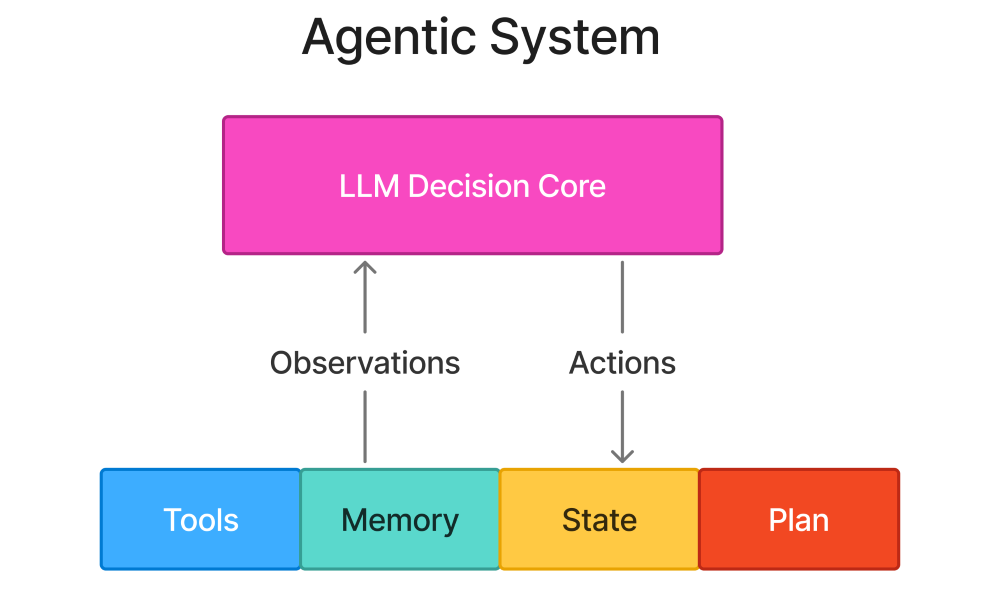
The LLM is still doing the thinking, but now it can actually do things with those thoughts.
The Five Capabilities
A system is agentic when it has these five capabilities. Not three, not four—five. They all matter.
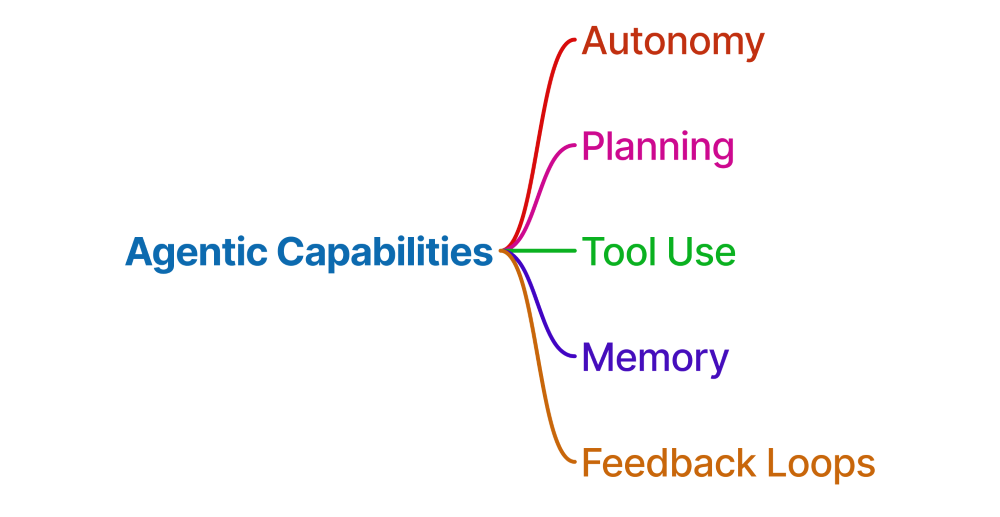
Autonomy
The system can make decisions without you spelling out every single step.
Non-agentic approach:
# You specify everything
result = search_database(query="sales data", filters={"year": 2024})
Agentic approach:
# System decides what to do
result = agent.execute("Find last year's sales data")
# Agent figures out: need to search, which year, what filters
Important clarification: Autonomy doesn’t mean unconstrained. Agents operate within bounds—we’ll cover this in Module 8 when we talk about safety.
Planning
The system breaks goals into executable steps instead of trying to do everything at once. For the goal “Research competitors and create a comparison report”, following figure demonstrates steps with planning and without planning.

The difference? With planning, the agent systematically gathers information before trying to synthesize it.
Tool Use
The system can interact with external systems through function calls.
Here’s what a tool looks like:
def get_weather(location: str) -> dict:
    """
    Get current weather for a location.

    Args:
        location: City name or zip code

    Returns:
        Dictionary with temperature, condition, humidity
    """
    return weather_api.fetch(location)
The LLM sees:
- Function name:
get_weather - Description: “Get current weather…”
- Parameters:
location(string)
And can decide to call it when the user asks about weather. That’s the key—it decides to use the tool based on context.
Memory
The system retains and recalls information across interactions using following three types of memory.
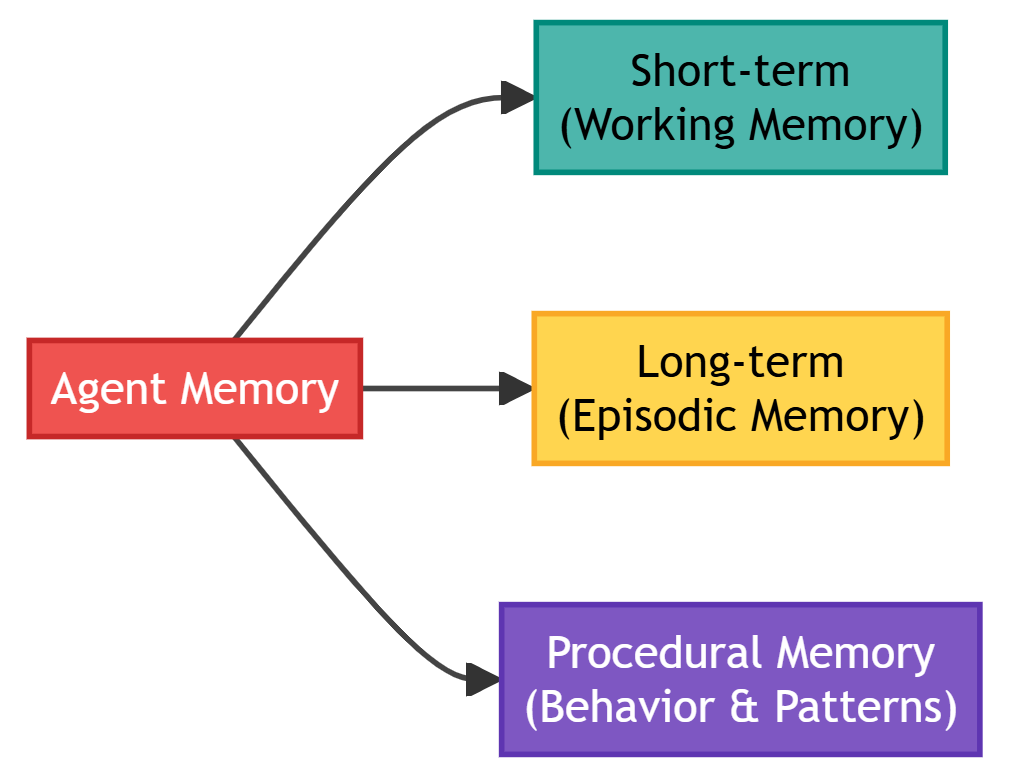
- Short-term (Working Memory): Keeps current conversation context.
messages = [
    {"role": "user", "content": "My name is Alice"},
    {"role": "assistant", "content": "Nice to meet you, Alice!"},
    {"role": "user", "content": "What's my name?"}
]- Long-term (Episodic Memory): Keeps past conversations and learned facts.
# Stored in vector database
memory.store("User prefers morning meetings")
memory.store("User is working on Q4 budget analysis")
Procedural Memory: Keeps learned behaviors and patterns
# Encoded in agent configuration or fine-tuned model
if task_type == "data_analysis":
    use_python_tool()
Memory is not optional for agents - without it, every interaction starts from zero.
Feedback Loops
Observe outcomes and adjust behavior.
# Attempt 1: Try to query database
result = agent.call_tool("query_db", sql="SELECT * FROM sales")

# Observation: Error - table name is 'sales_data' not 'sales'
if result.error:
    # Feedback: Adjust and retry
    result = agent.call_tool("query_db", sql="SELECT * FROM sales_data")
Why this matters:
- LLMs make mistakes (hallucinate, misinterpret, format errors)
- Feedback loops enable self-correction
- Critical for production reliability
The Anatomy of an Agentic Interaction
Let’s trace a single agentic interaction step-by-step:
User Request: “Book me a flight to NYC next Tuesday and add it to my calendar”
Step-by-Step Breakdown
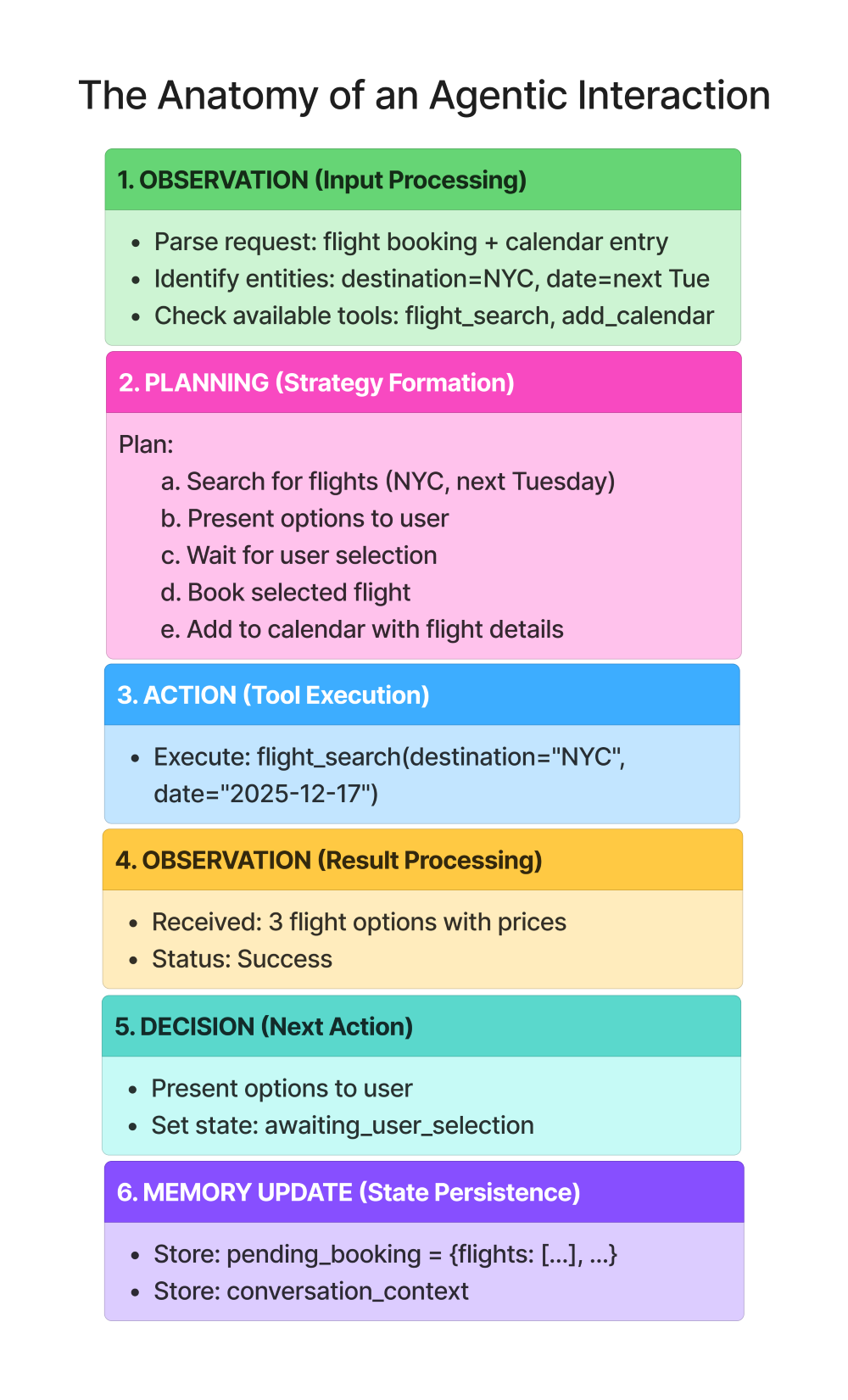
Key observations:
- Multiple decision points (not just one prompt-response)
- Tool usage based on need (not predefined)
- State management across steps
- User in the loop for critical decisions
Where Agents Fail in Production
Understanding failure modes is as important as understanding capabilities. Here are the most common production failures:
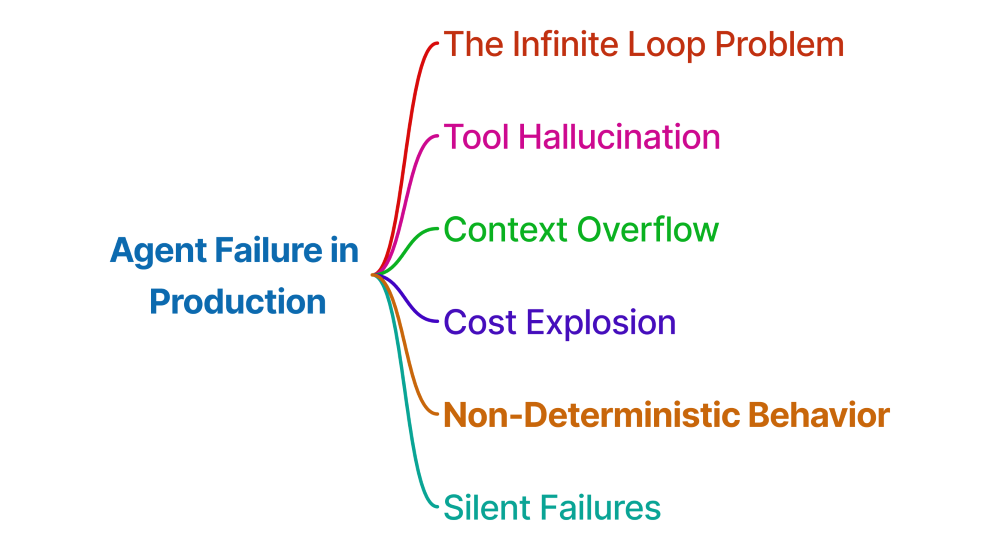
The Infinite Loop Problem
Symptom: Agent gets stuck in repetitive actions

Why it happens:
- No convergence criteria
- LLM doesn’t know when “enough is enough”
- No maximum iteration limit
Solution:
- Explicit termination conditions
- Maximum step limits
- Progress tracking
Tool Hallucination
Symptom: Agent tries to call tools that don’t exist

Why it happens:
- LLM trained on code examples with various function names
- LLM “invents” plausible-sounding tools
- No validation before attempted execution
Solution:
- Strict tool schema validation
- Return clear errors for unknown tools
- Include available tools in every prompt
Context Overflow
Symptom: Agent loses track of original goal

Why it happens:
- Context window limits (8k, 32k, 128k tokens)
- Information accumulates faster than it’s pruned
- No structured memory system
Solution:
- Summarization at checkpoints
- Hierarchical memory (Module 7)
- State compression techniques
Cost Explosion
Symptom: Single request costs $5+ in API calls

Why it happens:
- Every decision = API call
- Context grows = cost increases
- No budgeting or limits
Solution:
- Caching strategies
- Smaller models for simple decisions
- Cost caps and monitoring (Module 9)
Non-Deterministic Behavior
Symptom: Same input → Different outputs

Why it happens:
- LLM sampling (temperature > 0)
- No explicit workflow enforcement
- Optional vs required steps not specified
Solution:
- Deterministic control flow (LangGraph - Module 3)
- Explicit state machines
- Testing and validation frameworks (Module 9)
Silent Failures
Symptom: Agent appears to complete but produces wrong output

Why it happens:
- LLM will “fill in” missing information
- No explicit error propagation
- Unclear distinction between data and generation
Solution:
- Structured error handling
- Validation layers
- Clear separation of retrieved vs generated content
The Agent Spectrum
Not all agents are created equal. There’s a spectrum of autonomy:
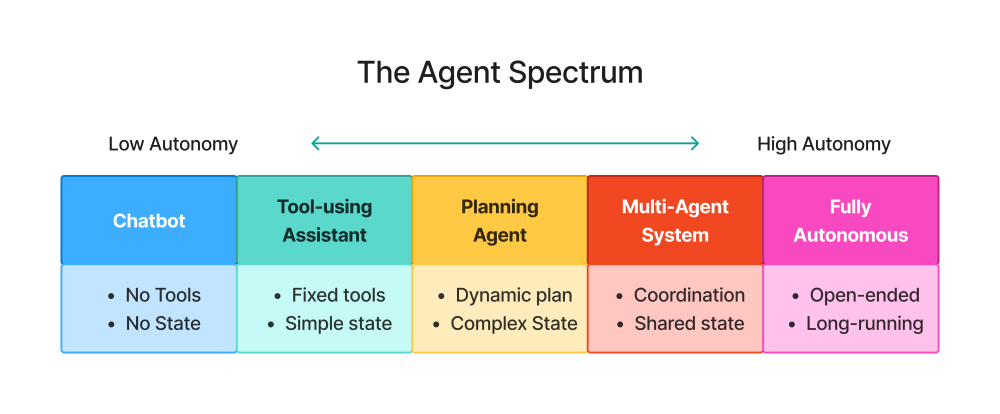
Position 1: Chatbot (No Agency)
- Pure LLM, no tools
- Example: ChatGPT without plugins
Position 2: Tool-Using Assistant (Low Agency)
- Can call specific tools
- No planning, responds to immediate requests
- Example: “Use calculator to compute 123 * 456”
Position 3: Planning Agent (Medium Agency)
- Decomposes tasks into steps
- Uses tools strategically
- Example: “Research X and write a report” → Plans research strategy
Position 4: Multi-Agent System (High Agency)
- Multiple specialized agents collaborate
- Coordination and delegation
- Example: Research Agent + Writing Agent + Fact-Checker Agent
Position 5: Fully Autonomous Agent (Maximum Agency)
- Open-ended goal execution
- Long-running (hours/days)
- Minimal human oversight
- Example: “Grow the company’s Twitter following” (rarely practical in production)
This book focuses on Positions 2-4, which represent practical, production-ready agent systems.
Exercise: From Chatbot to Decision-Making System
Objective: Transform a simple Q&A chatbot into a system that can make decisions and take actions.
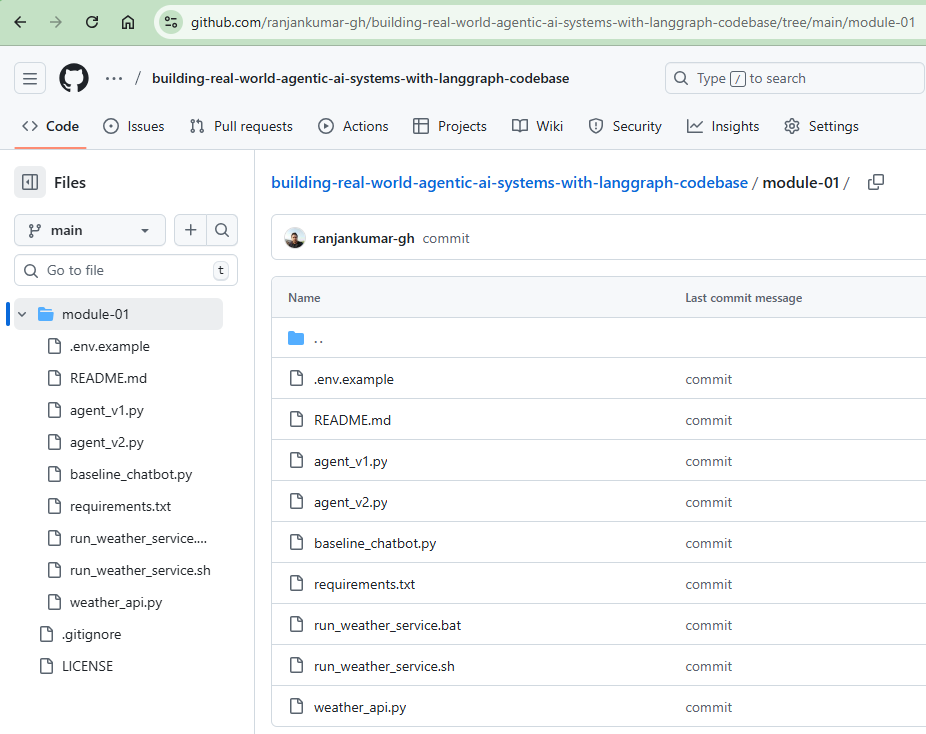
Github Codebase URL: https://github.com/ranjankumar-gh/building-real-world-agentic-ai-systems-with-langgraph-codebase/tree/main/module-01
Read README.md for steps.
Install Python Dependencies: pip install -r requirements.txt
Part A: The Baseline Chatbot
First, let’s implement a basic chatbot. Instead of using cloud based LLMs such as ChatGPT, Claude etc., I have used qwen3:8b hosted on Ollama (Local machine). There will not be much change in the code if you choose to go for cloud based LLMs.
baseline_chatbot.py
A simple chatbot that responds to user messages without any tools or capabilities beyond text generation.
Features:
- System prompt: “You are a helpful assistant.”
- Direct message handling without conversation history
- Three test queries demonstrating basic capabilities
How it works:
- Uses Ollama’s chat API with Qwen3:8b
- Each query is independent with no memory of previous interactions
Run the code: python baseline_chatbot.py
# baseline_chatbot.py
import ollama

def chatbot(user_message: str) -> str:
    """Simple chatbot - just responds to messages."""
    response = ollama.chat(
        model="qwen3:8b",
        messages=[
            {"role": "system", "content":
             "You are a helpful assistant."},
            {"role": "user", "content": user_message}
        ]
    )
    return response['message']['content']

# Test it
print(chatbot("What's 25 * 17?"))
print(chatbot("What's the weather in Tokyo?"))
print(chatbot("Send an email to mail@ranjankumar.in"))
Output (I received):
(env) D:\github\building-real-world-agentic-ai-systems-with-langgraph-codebase\module-01>python baseline_chatbot.py
The product of 25 and 17 is **425**.

Here's how it's calculated:
**25 × 17**
Break it down:

- 25 × 10 = 250
- 25 × 7 = 175
Add the results: **250 + 175 = 425**

Alternatively, using another method:
**25 × (20 - 3) = (25 × 20) - (25 × 3) = 500 - 75 = 425**

Either way, the answer is **425**.
As of my last update in October 2023, I can't provide real-time weather data. However, here's a general overview for Tokyo during typical spring conditions (April-May):

- **Temperature**: Usually mild, ranging from **15°C to 20°C (59°F to 68°F)**.
- **Weather**: Spring in Tokyo can be rainy, especially in late April. Early April is generally drier.
- **Recommendation**: Check a trusted weather service (e.g., Japan Meteorological Agency, Weather.com) for the latest forecast. Pack an umbrella and light layers for potential rain or cooler mornings.

Let me know if you'd like help finding a specific weather service! 🌦️
Sure! To help you draft an email, I'll need a few details. Could you please provide:

1. **Subject line** (e.g., "Meeting Reminder" or "Project Update")
2. **Message content** (e.g., the body of the email)

Once you share these, I’ll format it for you! 📨
*(Note: I can’t send emails directly, but I’ll help craft the message.)*
Analysis: The chatbot can only generate text. It cannot:
- Perform calculations reliably (in this case it did it correctly though)
- Access real-time data
- Take actions in the real world
Part B: Adding Tools (Basic Agency)
Note: Get the source code from above mentioned Github Codebase URL.
An advanced implementation that extends the baseline chatbot with tool-calling capabilities. The agent can use external tools to accomplish tasks.
agent_v1.py
Available Tools:
calculator- Perform basic math operations (add, subtract, multiply, divide)get_weather- Get current weather for a city (uses local weather service)send_email- Send an email (simulated for demo purposes)
How it works:
- The agent receives a user request
- If needed, it decides which tool(s) to use
- Executes the selected tools with appropriate parameters
- Uses tool results to formulate the final response
- Supports multi-step reasoning with tool chaining
Example interactions:
- “What’s 25 * 17?” → Uses calculator tool
- “What’s the weather in Tokyo?” → Uses get_weather tool (works with local weather service)
- “Send an email to mail@ranjankumar.in” → Uses send_email tool (simulated)
weather_api.py
Instead of relying on realtime weather API, I have provided the code for local weather API. It’s a local FastAPI service that provides mock weather data.
Features:
- RESTful API format for weather data
- Pre-configured mock data for major cities (Tokyo, New York, London, Paris, Sydney)
- Random weather generation for unknown cities
- API key authentication
- Interactive API documentation at /docs
How it works:
- Runs as a standalone FastAPI server on port 8000
- Accepts requests at
data/2.5/weather?q=CITY&appid=API_KEY - Returns weather data in JSON format
- No external API calls - all data is mocked locally
Environment:
- copy the file from .env.example to .env
Runing:
- Start the local weather service in a separate terminal:
python weather_api.py - Run the agent (in another terminal):
python agent_v1.py
# agent_v2.py
import ollama
import json
import requests
import os
from dotenv import load_dotenv

# Load environment variables
load_dotenv()

# Define available tools
def calculator(operation: str, x: float, y: float) -> float:
    """Perform basic math operations."""
    ops = {
        "add": x + y,
        "subtract": x - y,
        "multiply": x * y,
        "divide": x / y if y != 0 else "Error: Division by zero"
    }
    return ops.get(operation, "Unknown operation")

def get_weather(city: str) -> dict:
    """Get current weather for a city."""
    # Get API key and URL from environment variables
    api_key = os.getenv("WEATHER_API_KEY")
    weather_api_url = os.getenv("WEATHER_API_URL", "http://localhost:8000/data/2.5/weather")

    if not api_key:
        return {"error": "Weather API key not found. Please set WEATHER_API_KEY in .env file"}

    url = f"{weather_api_url}?q={city}&appid={api_key}"

    try:
        response = requests.get(url)
        if response.status_code == 200:
            data = response.json()
            return {
                "temperature": round(data["main"]["temp"] - 273.15, 1),  # Convert to Celsius
                "condition": data["weather"][0]["description"],
                "humidity": data["main"]["humidity"]
            }
        elif response.status_code == 401:
            return {"error": "Invalid API key"}
        else:
            return {"error": f"Could not fetch weather (status code: {response.status_code})"}
    except Exception as e:
        return {"error": f"Error fetching weather: {str(e)}"}

def send_email(to: str, subject: str, body: str) -> str:
    """Send an email (simulated)."""
    # In production, integrate with email service
    print(f"[SIMULATED] Sending email to {to}")
    print(f"Subject: {subject}")
    print(f"Body: {body}")
    return f"Email sent to {to}"

# Tool definitions for the LLM
tools = [
    {
        "type": "function",
        "function": {
            "name": "calculator",
            "description": "Perform basic math operations",
            "parameters": {
                "type": "object",
                "properties": {
                    "operation": {
                        "type": "string",
                        "enum": ["add", "subtract", "multiply", "divide"]
                    },
                    "x": {"type": "number"},
                    "y": {"type": "number"}
                },
                "required": ["operation", "x", "y"]
            }
        }
    },
    {
        "type": "function",
        "function": {
            "name": "get_weather",
            "description": "Get current weather for a city",
            "parameters": {
                "type": "object",
                "properties": {
                    "city": {"type": "string"}
                },
                "required": ["city"]
            }
        }
    },
    {
        "type": "function",
        "function": {
            "name": "send_email",
            "description": "Send an email",
            "parameters": {
                "type": "object",
                "properties": {
                    "to": {"type": "string"},
                    "subject": {"type": "string"},
                    "body": {"type": "string"}
                },
                "required": ["to", "subject", "body"]
            }
        }
    }
]

# Map function names to actual functions
available_functions = {
    "calculator": calculator,
    "get_weather": get_weather,
    "send_email": send_email
}

def intelligent_agent(user_message: str, conversation_history: list = None) -> dict:
    """
    Agent with decision logic:
    - Maintains conversation history (memory)
    - Makes decisions about which tools to use
    - Provides reasoning for actions
    """
    if conversation_history is None:
        conversation_history = []

    # Add system prompt with decision-making instructions
    messages = [
        {
            "role": "system",
            "content": """You are an intelligent assistant that can:
1. Use tools when needed
2. Explain your reasoning
3. Ask for clarification if needed
4. Remember previous context

Before using a tool, briefly explain why you're using it.
If you cannot complete a task, explain what's missing."""
        }
    ]

    # Add conversation history
    messages.extend(conversation_history)
    messages.append({"role": "user", "content": user_message})

    # Agent loop with reasoning
    response = ollama.chat(
        model="qwen3:8b",
        messages=messages,
        tools=tools
    )

    response_message = response['message']
    reasoning = response_message.get('content', "Using tools to help...")

    messages.append(response_message)

    # Execute tools if needed
    tool_results = []
    if response_message.get('tool_calls'):
        for tool_call in response_message['tool_calls']:
            function_name = tool_call['function']['name']
            function_args = tool_call['function']['arguments']

            print(f"[AGENT REASONING] {reasoning}")
            print(f"[AGENT ACTION] Calling {function_name} with {function_args}")

            function_to_call = available_functions[function_name]
            function_response = function_to_call(**function_args)

            tool_results.append({
                "tool": function_name,
                "input": function_args,
                "output": function_response
            })

            messages.append({
                "role": "tool",
                "content": json.dumps(function_response) if not isinstance(function_response, str) else function_response
            })

        # Get final response
        final_response = ollama.chat(
            model="qwen3:8b",
            messages=messages
        )

        return {
            "response": final_response['message']['content'],
            "reasoning": reasoning,
            "actions": tool_results,
            "conversation_history": messages
        }

    return {
        "response": response_message.get('content', ''),
        "reasoning": "No tools needed",
        "actions": [],
        "conversation_history": messages
    }

# Test with multi-turn conversation
print("=== Conversation Test ===")
history = []

# Turn 1
result1 = intelligent_agent("My name is Alice and I'm planning a trip to Tokyo", history)
print(f"Assistant: {result1['response']}\n")
history = result1['conversation_history']

# Turn 2
result2 = intelligent_agent("What's the weather there?", history)
print(f"Reasoning: {result2['reasoning']}")
print(f"Actions: {result2['actions']}")
print(f"Assistant: {result2['response']}\n")
history = result2['conversation_history']

# Turn 3
result3 = intelligent_agent("What was my name again?", history)
print(f"Assistant: {result3['response']}")
=== Test 1: Calculation === The result of \(25 \times 17\) is 425.
Here’s a quick breakdown: \(25 \times 10 = 250\) \(25 \times 7 = 175\) Adding them together: \(250 + 175 = 425\).
Let me know if you need further clarification! 😊
=== Test 2: Weather === The current weather in Tokyo is 22.0°C with partly cloudy conditions and 65% humidity. It’s a mild day with comfortable temperatures! 🌤️
=== Test 3: Email === [SIMULATED] Sending email to mail@ranjankumar.in Subject: Meeting Body: Let’s meet tomorrow The email with the subject “Meeting” has been successfully sent to mail@ranjankumar.in. Let me know if you need anything else!
**Analysis:** The agent now:

- Performs accurate calculations
- Accesses real-time data (I have used local API for demonstration purposes, but can be connected to real-time API)
- Takes actions (simulated email)

**But it still lacks:**

- Planning for multi-step tasks
- Memory across interactions
- Self-correction on errors

### Part C: Adding Decision Logic (Enhanced Agency)

**Note:** Get the source code from above mentioned Github Codebase URL.

Let's add basic decision-making.

#### `agent_v2.py`

An intelligent agent that builds upon agent_v1 with enhanced capabilities including conversation memory and explicit reasoning.

**Key Features:**

- Conversation Memory - Maintains conversation history across multiple turns
- Explicit Reasoning - Explains why it's using tools before executing them
- Contextual Understanding - Uses previous conversation context to understand references
- Structured Output - Returns detailed response including reasoning and actions taken

**Available Tools:**

- Same as agent_v1: calculator, get_weather, send_email

**How it works:**

- Maintains conversation history throughout the session
- Provides reasoning for actions before executing tools
- Returns a structured dictionary with:
    - `response`: The agent's final answer
    - `reasoning`: Explanation of the agent's thought process
    - `actions`: List of tools used with inputs and outputs
    - `conversation_history`: Full conversation context

**Example multi-turn conversation:**

1. User: "My name is Alice and I'm planning a trip to Tokyo"
    - Agent remembers the name and destination
2. User: "What's the weather there?"
    - Agent understands "there" refers to Tokyo from context
    - Calls weather tool and provides forecast
3. User: "What was my name again?"
    - Agent retrieves "Alice" from conversation history

```python
# agent_v2.py
import ollama
import json
import requests
import os
from dotenv import load_dotenv

# Load environment variables
load_dotenv()

# Define available tools
def calculator(operation: str, x: float, y: float) -> float:
    """Perform basic math operations."""
    ops = {
        "add": x + y,
        "subtract": x - y,
        "multiply": x * y,
        "divide": x / y if y != 0 else "Error: Division by zero"
    }
    return ops.get(operation, "Unknown operation")

def get_weather(city: str) -> dict:
    """Get current weather for a city."""
    # Get API key and URL from environment variables
    api_key = os.getenv("WEATHER_API_KEY")
    weather_api_url = os.getenv("WEATHER_API_URL", "http://localhost:8000/data/2.5/weather")

    if not api_key:
        return {"error": "Weather API key not found. Please set WEATHER_API_KEY in .env file"}

    url = f"{weather_api_url}?q={city}&appid={api_key}"

    try:
        response = requests.get(url)
        if response.status_code == 200:
            data = response.json()
            return {
                "temperature": round(data["main"]["temp"] - 273.15, 1),  # Convert to Celsius
                "condition": data["weather"][0]["description"],
                "humidity": data["main"]["humidity"]
            }
        elif response.status_code == 401:
            return {"error": "Invalid API key"}
        else:
            return {"error": f"Could not fetch weather (status code: {response.status_code})"}
    except Exception as e:
        return {"error": f"Error fetching weather: {str(e)}"}

def send_email(to: str, subject: str, body: str) -> str:
    """Send an email (simulated)."""
    # In production, integrate with email service
    print(f"[SIMULATED] Sending email to {to}")
    print(f"Subject: {subject}")
    print(f"Body: {body}")
    return f"Email sent to {to}"

# Tool definitions for the LLM
tools = [
    {
        "type": "function",
        "function": {
            "name": "calculator",
            "description": "Perform basic math operations",
            "parameters": {
                "type": "object",
                "properties": {
                    "operation": {
                        "type": "string",
                        "enum": ["add", "subtract", "multiply", "divide"]
                    },
                    "x": {"type": "number"},
                    "y": {"type": "number"}
                },
                "required": ["operation", "x", "y"]
            }
        }
    },
    {
        "type": "function",
        "function": {
            "name": "get_weather",
            "description": "Get current weather for a city",
            "parameters": {
                "type": "object",
                "properties": {
                    "city": {"type": "string"}
                },
                "required": ["city"]
            }
        }
    },
    {
        "type": "function",
        "function": {
            "name": "send_email",
            "description": "Send an email",
            "parameters": {
                "type": "object",
                "properties": {
                    "to": {"type": "string"},
                    "subject": {"type": "string"},
                    "body": {"type": "string"}
                },
                "required": ["to", "subject", "body"]
            }
        }
    }
]

# Map function names to actual functions
available_functions = {
    "calculator": calculator,
    "get_weather": get_weather,
    "send_email": send_email
}

def intelligent_agent(user_message: str, conversation_history: list = None) -> dict:
    """
    Agent with decision logic:
    - Maintains conversation history (memory)
    - Makes decisions about which tools to use
    - Provides reasoning for actions
    """
    if conversation_history is None:
        conversation_history = []

    # Add system prompt with decision-making instructions
    messages = [
        {
            "role": "system",
            "content": """You are an intelligent assistant that can:
1. Use tools when needed
2. Explain your reasoning
3. Ask for clarification if needed
4. Remember previous context

Before using a tool, briefly explain why you're using it.
If you cannot complete a task, explain what's missing."""
        }
    ]

    # Add conversation history
    messages.extend(conversation_history)
    messages.append({"role": "user", "content": user_message})

    # Agent loop with reasoning
    response = ollama.chat(
        model="qwen3:8b",
        messages=messages,
        tools=tools
    )

    response_message = response['message']
    reasoning = response_message.get('content', "Using tools to help...")

    messages.append(response_message)

    # Execute tools if needed
    tool_results = []
    if response_message.get('tool_calls'):
        for tool_call in response_message['tool_calls']:
            function_name = tool_call['function']['name']
            function_args = tool_call['function']['arguments']

            print(f"[AGENT REASONING] {reasoning}")
            print(f"[AGENT ACTION] Calling {function_name} with {function_args}")

            function_to_call = available_functions[function_name]
            function_response = function_to_call(**function_args)

            tool_results.append({
                "tool": function_name,
                "input": function_args,
                "output": function_response
            })

            messages.append({
                "role": "tool",
                "content": json.dumps(function_response) if not isinstance(function_response, str) else function_response
            })

        # Get final response
        final_response = ollama.chat(
            model="qwen3:8b",
            messages=messages
        )

        return {
            "response": final_response['message']['content'],
            "reasoning": reasoning,
            "actions": tool_results,
            "conversation_history": messages
        }

    return {
        "response": response_message.get('content', ''),
        "reasoning": "No tools needed",
        "actions": [],
        "conversation_history": messages
    }

# Test with multi-turn conversation
print("=== Conversation Test ===")
history = []

# Turn 1
result1 = intelligent_agent("My name is Alice and I'm planning a trip to Tokyo", history)
print(f"Assistant: {result1['response']}\n")
history = result1['conversation_history']

# Turn 2
result2 = intelligent_agent("What's the weather there?", history)
print(f"Reasoning: {result2['reasoning']}")
print(f"Actions: {result2['actions']}")
print(f"Assistant: {result2['response']}\n")
history = result2['conversation_history']

# Turn 3
result3 = intelligent_agent("What was my name again?", history)
print(f"Assistant: {result3['response']}")
Output (I received):
=== Conversation Test ===
[AGENT REASONING]
[AGENT ACTION] Calling get_weather with {'city': 'Tokyo'}
Assistant: The current weather in Tokyo is **22°C** with **partly cloudy** skies and **65% humidity**. This mild and comfortable weather is perfect for exploring the city! 🌸

Would you like suggestions for activities, dining, or transportation in Tokyo? I’d be happy to help! 😊

Reasoning: No tools needed
Actions: []
Assistant: The current weather in Tokyo is **partly cloudy** with a temperature of **22.0°C** and **65% humidity**. You might want to pack light clothing and a light jacket for day trips! 🌸

Assistant: Your name is Alice! 😊 You mentioned it when you started planning your trip to Tokyo. Let me know if you need help with anything else!
Key improvements:
- Memory: Agent remembers “Alice” and “Tokyo” from earlier
- Contextual tool use: “What’s the weather there?” → Infers “Tokyo”
- Reasoning transparency: Shows why it’s calling tools
Part D: Extension Challenges
Try extending the agent further:
Challenge 1: Add error handling
What happens if:
- The weather API is down?
- The user provides invalid email format?
- The calculator gets division by zero?
Implement graceful degradation
Challenge 2: Add planning
- Handle: “Check the weather in Tokyo and Paris, then email me a comparison”
- Agent should:
- Plan: Need to call get_weather twice, then send_email once
- Execute: Get both weather reports
- Synthesize: Compare the data
- Act: Send email with comparison
Challenge 3: Add cost tracking
Track:
- Number of LLM calls
- Total tokens used
- Estimated cost
Display after each interaction
Key Takeaways
What You Learned
- LLMs vs Agents
- LLMs generate text; agents make decisions and take actions
- The five pillars of agency: Autonomy, Planning, Tools, Memory, Feedback
- Production Realities
- Agents fail in predictable ways (loops, hallucinations, cost explosion)
- Reliability requires explicit control mechanisms
- Full autonomy is rarely practical
- The Agency Spectrum
- Not all systems need maximum autonomy
- Start with tool-using assistants, scale thoughtfully
- Production agents occupy the middle ground
- From Theory to Practice
- Built a simple agent with tools
- Added memory and decision-making
- Observed the difference between passive and active systems
Common Misconceptions Addressed
- “Agents are just prompts with tools” Agents require state management, error handling, and control flow.
- “More autonomy = better” Controlled, observable autonomy is better than unconstrained freedom
- “Agents will replace developers” Agents are tools that developers build and control
- “Production agents are like AutoGPT” Production systems use deterministic flows, not open-ended loops
What’s Next
In Module 2, we’ll dive deep into the core building blocks of agents:
- Detailed anatomy of the agent loop
- Tool calling mechanics and patterns
- Memory types and when to use each
- The observation-action cycle
You’ll build a single-loop agent using LangChain and understand the foundational patterns that underpin all agent systems.
Common Pitfalls & How to Avoid Them
Pitfall 1: Treating Agents Like Chatbots
Symptom: Expecting one-shot responses to complex tasks
This won’t work well:
- agent(“Build a complete data pipeline”)
The agent has no way to:
- Ask clarifying questions
- Show incremental progress
- Handle errors across steps
Solution: Design for iterative interactions
Better approach:
agent("What information do you need to build a data pipeline?")- Agent asks for: source, destination, transformations, schedule
agent("Source: PostgreSQL, Destination: S3, ...")- Agent creates plan and executes step-by-step
Pitfall 2: Over-Engineering Early
Symptom: Building multi-agent systems before mastering single agents
Why it’s tempting: Multi-agent systems sound sophisticated
Reality: They amplify failure modes
- Coordination overhead
- Debugging becomes exponentially harder
- Cost and latency multiply
Solution: Master simple agents first. Add complexity only when needed.
Pitfall 3: Ignoring Error States
Symptom: Assuming tools always succeed
def agent_loop(task):
    plan = create_plan(task)
    for step in plan:
        execute(step)  # What if this fails?
    return result
Solution: Explicit error handling from day one
def agent_loop(task):
    plan = create_plan(task)
    for step in plan:
        result = execute(step)
        if result.error:
            # Attempt retry or alternative approach
            handle_error(result.error, step)
    return result
Pitfall 4: No Termination Strategy
Symptom: Agent runs indefinitely or hits token limits
# Dangerous: No exit condition
while True:
    action = agent.decide()
    result = execute(action)
    if goal_achieved(result):
        break  # But what if this never happens?
Solution: Multiple termination conditions
max_steps = 10
max_cost = 1.00  # dollars
timeout = 60  # seconds

for step in range(max_steps):
    if time_elapsed() > timeout:
        return "Timeout"
    if estimated_cost() > max_cost:
        return "Budget exceeded"
    if goal_achieved():
        return "Success"

    # Execute step...
Production Considerations (Preview)
While we’ll cover production deployment in depth in Module 10, here are early considerations:
Observability
Question: Can you see what the agent is doing?
Requirements:
- Log every LLM call (input, output, tokens, cost)
- Track tool invocations
- Record decision points
# Bad: No visibility
result = agent.run(task)

# Good: Full trace
with agent.trace() as trace:
    result = agent.run(task)
    trace.log_to_file("agent_trace.json")
Cost Control
Question: What’s the maximum cost per request?
Requirements:
- Token counting before expensive operations
- Cost caps per user/session
- Caching for repeated operations
Safety
Question: What can go wrong?
Requirements:
- Tool permission system (which tools can be auto-executed?)
- Human-in-the-loop for critical actions
- Rollback mechanisms
We’ll build all of this in later modules. For now, keep these questions in mind as you build.
Hands-On Exercises Summary
What You Built
- Baseline chatbot - Pure LLM, no tools
- Tool-using agent - Can execute functions
- Intelligent agent - Adds reasoning and memory
Exercise Checklist
Starter Code Location
All code for this module is available in: https://github.com/ranjankumar-gh/building-real-world-agentic-ai-systems-with-langgraph-codebase/tree/main/module-01
Additional Resources
Reflection Questions
Before moving to Module 2, reflect on these questions:
- Can you explain the difference between an LLM and an agent to a colleague?
- What makes something “agentic”?
- What are the five core capabilities?
- Which failure mode concerns you most for production?
- Infinite loops?
- Cost explosion?
- Silent failures?
- Why?
- Where on the agency spectrum do your use cases fall?
- Simple tool-using assistant?
- Complex planning agent?
- Multi-agent system?
- What production concerns came up in your exercise?
- How would you monitor this agent?
- What could go wrong?
- How would you test it?
Next: Module 2 - Core Agent Building Blocks
Now that you understand what makes a system agentic and why agents are different from LLMs, you’re ready to dive into the technical architecture.
In Module 2, you’ll learn:
- The anatomy of the agent loop (in detail)
- How tool calling actually works under the hood
- Memory architectures: short-term, long-term, episodic
- The observation-action cycle and why it matters
- How to build a production-grade single-loop agent
Key shift: From conceptual understanding to technical implementation
Exercise preview: Build a fully functional agent using LangChain with proper state management and error handling.
Appendix: Quick Reference
Agent vs LLM: Decision Matrix
| Capability | LLM | Agent |
|---|---|---|
| Text generation | ✅ | ✅ |
| Multi-turn conversation | ❌ | ✅ |
| Execute actions | ❌ | ✅ |
| Access real-time data | ❌ | ✅ |
| Plan multi-step tasks | ❌ | ✅ |
| Self-correction | ❌ | ✅ |
| State persistence | ❌ | ✅ |
Five Pillars of Agency
- Autonomy - Makes decisions without step-by-step instructions
- Planning - Decomposes goals into executable steps
- Tools - Interacts with external systems
- Memory - Retains state across interactions
- Feedback - Observes outcomes and adapts
Common Failure Modes
- Infinite loops - No termination condition
- Tool hallucination - Inventing non-existent functions
- Context overflow - Losing track of original goal
- Cost explosion - Uncontrolled API usage
- Non-determinism - Same input, different outputs
- Silent failures - Errors not surfaced to user
When to Use Agents
Good fit:
- Tasks requiring multiple API calls
- Workflows with conditional logic
- Long-running operations
- Systems needing error recovery
Poor fit:
- Simple Q&A (use LLM directly)
- Fully deterministic workflows (use traditional code)
- Real-time, low-latency responses
- Safety-critical, zero-tolerance systems